
I remember the exact moment I knew something was wrong. It wasn’t a dramatic injury — no snap, no fall. I was three hours into a debugging session, another three to go, and my right wrist felt like someone had driven a finishing nail through the underside of it. I shook it out. It faded. Twenty minutes later, it came back.
In a Hurry? Start Here
Wrist pain from typing, gaming, and desk work is widespread but preventable. This guide covers the biomechanics of repetitive strain, how to adjust your keyboard height and monitor position, the evidence on split keyboards and vertical mice, five stretches that physical therapists actually recommend, and daily habits that prevent damage from compounding. Plus: when to see a doctor, and why most ergonomic interventions are cheaper than surgery.
Table of Contents
Disclosure: TechDeskZone is reader-supported. When you buy through links on our site, we may earn an affiliate commission at no additional cost to you. See our affiliate disclosure for details.
Medical Disclaimer: This article is for informational purposes only and does not constitute medical advice. If you have persistent pain, numbness, or weakness, consult a qualified healthcare professional.
I wasn’t alone. Not even close. In the United States, 1.8 million workers develop repetitive strain injuries every year — 600,000 of them take time off to recover. Among people who work with computers, nearly half report RSI-related pain in their wrists, hands, neck, or shoulders. If you type for a living, game for fun, or both, the odds are not in your favor. I’ve covered specific fixes for typists in our Wrist Pain From Typing guide, which breaks down the five adjustments that made the biggest difference in my own setup.
This isn’t a scare piece. It’s a prevention guide written by someone who caught it early and spent the better part of a decade figuring out what actually works — not just what ergonomic brands want you to buy.
The Anatomy of What’s Going Wrong Inside Your Wrist
Before you fix something, it helps to know what you’re fixing. When you type or mouse in a position that bends your wrists — upward, downward, or twisted outward — you’re compressing the carpal tunnel, a narrow passageway of bones and ligaments in your wrist that houses the median nerve and nine flexor tendons. Keep those tendons sliding through a pinched tunnel eight hours a day, and they swell. The swelling squeezes the nerve. The nerve starts sending pain signals up your arm.
That’s carpal tunnel syndrome, and it accounts for roughly a third of all occupational repetitive motion injuries — more than any other single condition. CTS surgery is among the most common musculoskeletal surgeries performed, with over 450,000 procedures annually in the U.S. BLS Recovery can mean weeks or months away from work, and while many patients improve, surgery doesn’t guarantee a full return to symptom-free function — especially for those who’ve had nerve compression for years before seeking treatment.
But carpal tunnel isn’t the only thing gunning for your wrists. Tendonitis — inflammation of the tendons themselves — sidelines 70,000 workers annually. Cubital tunnel syndrome, the ulnar nerve’s version of CTS, hits at a rate of 30 cases per 100,000 person-years. And if you’re on your phone as much as you’re on your keyboard, De Quervain’s tenosynovitis — “texting thumb” — is another common strain pattern worth knowing about. Research has found notably high rates of this condition among heavy mobile users. Your wrists are getting attacked from multiple angles.
Risk isn’t evenly distributed, either. Women are disproportionately affected by carpal tunnel syndrome, accounting for a significant majority of cases in workforce studies. Obesity raises CTS risk substantially — one analysis found 2.5 times higher likelihood among obese individuals. NCBI study And many young workers spend at least a quarter of their work time on repetitive tasks, building damage that compounds for years before symptoms surface. The takeaway isn’t to panic. It’s to understand that wrist pain is rarely a single-cause problem — which means the solution is never a single-fix answer either.
Fix Your Workspace Setup Before Anything Else
You can stretch all day, but if your desk setup is actively injuring you for eight to twelve hours, the stretches are just damage control. Start here. For a full breakdown of desk ergonomics from chair height to monitor placement, our Ergonomic Home Office Setup guide covers every adjustment in detail.
Keyboard Height Is Everything
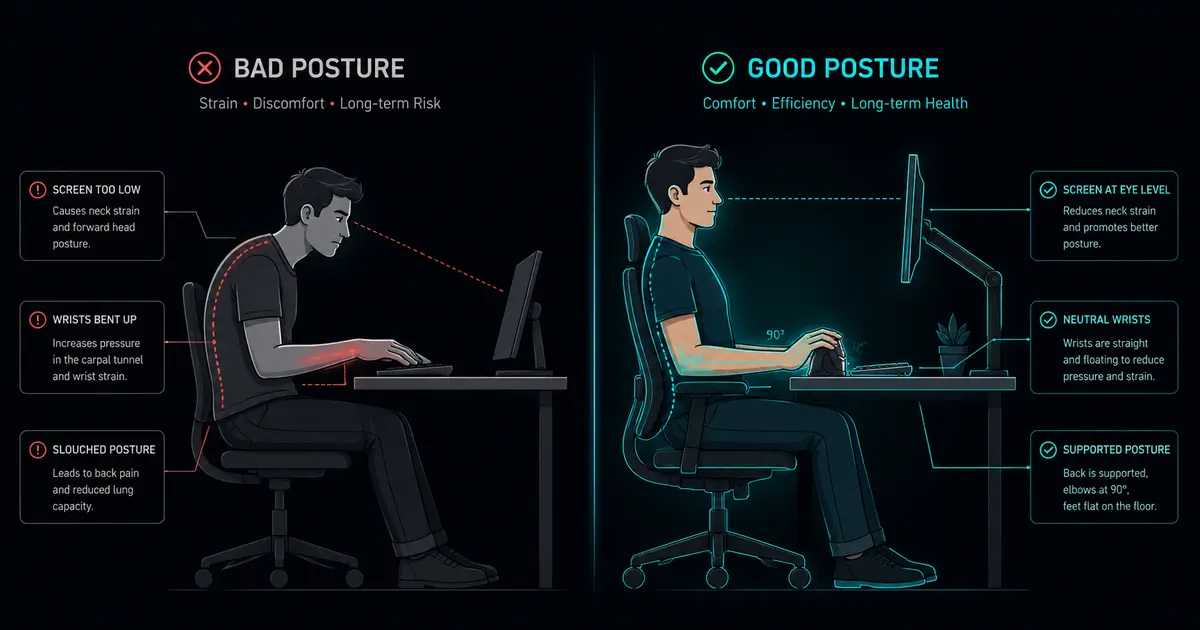
A large-scale survey of U.S. computer workers found that over half had keyboards positioned too high for neutral wrist posture. When your keyboard sits above elbow level, you compensate by extending your wrists upward — a position called wrist extension. Sustained wrist extension compresses the carpal tunnel and strains the extensor tendons.
The fix: your elbows should be at roughly 90 degrees, forearms parallel to the floor, wrists floating straight and neutral — not bent up, not bent down, not twisted. If your desk is too high and you can’t lower it, raise your chair and use a footrest. If your chair won’t go high enough, a keyboard tray that mounts below the desk surface is a $30 fix that does more for your wrists than a $300 keyboard. Our Best Ergonomic Footrest guide has tested picks if raising your chair leaves you dangling.
The Wrist Rest Debate
Wrist rests are marketed as ergonomic essentials, but the research picture is more complicated than the marketing suggests. OSHA’s guidance notes that wrist rests can reduce wrist-bend angle and contact stress, but also warns that resting on them while actively typing could increase awkward wrist postures. Some ergonomics specialists argue that loading your body weight onto a wrist rest can increase pressure inside the carpal tunnel — though the direct evidence linking wrist rest use to measurable increases in carpal tunnel pressure is limited.
The practical middle ground: if you use a wrist rest, use it between typing bursts, not during them. Rely on palm contact — the heel of your hand, not the wrist joint. Better still, learn to hover: hands floating above the keyboard while typing, wrists straight, fingers doing the work. Rest your hands in your lap between bursts, not on a pad. The goal is to avoid sustained pressure on the underside of the wrist, regardless of what surface that pressure comes from.
Monitor Height and Arm Position
A monitor that’s too low makes you slouch. Slouching rolls your shoulders forward. Forward shoulders pull on your neck, which pulls on the nerve chain that runs all the way down to your fingertips. It’s all connected. Top of the screen at eye level. Chair armrests adjusted so your shoulders aren’t hunched or shrugged. Feet flat on the floor or a footrest. If your monitor sits on a fixed surface, a good monitor arm gives you the range of motion to dial in the exact height and distance your neck and wrists need.
Gaming-Specific Setup Notes
If you game on the same desk you work on, you probably use two very different postures. WASD gaming often means a tilted keyboard, a forward lean, and a claw grip on the mouse — all of which increase wrist tension. If possible, slide your keyboard left for gaming so your mouse hand isn’t reaching across your body. Keep the mouse close to the keyboard edge to avoid an extended lateral reach. And if you’re an arm aimer in FPS games, good — you’re already distributing movement across your shoulder and elbow instead of micro-adjusting with your wrist alone.
The Keyboard and Mouse Conversation No One Wants to Have
I’ve tested more keyboards and mice than I can count, and I’ll save you the trial-and-error: your input devices either support neutral wrist posture or they actively fight it. For a deep dive on matching gear to your body, our Keyboard and Mouse Setup Guide covers 12 tested combos that fixed chronic pain for real office workers.
Keyboards That Reduce Strain
Standard flat keyboards force your hands into two positions that stress the wrist — ulnar deviation (hands tilted outward toward the pinky side) and pronation (palms flat, facing down). Split keyboards address both. By separating the left and right halves, you can position each at shoulder width, eliminating ulnar deviation. Tenting — angling each half so your thumbs are higher than your pinkies — reduces forearm pronation.
You don’t need to go full split with a $350 keyboard. A gently curved or Alice-layout board gets you most of the benefit. What matters is that your wrists stay straight when you type. Mechanical switches help too: lighter actuation force means less finger effort, and less finger effort means less strain transmitted through the wrist. If you need a quiet office-friendly board, our Silent Mechanical Keyboards guide has lab-tested options that won’t annoy your cube neighbours.
Vertical Mice: The Evidence
A standard horizontal mouse forces your forearm into full pronation — palm facing the desk. A vertical mouse rotates your hand into a handshake position, which a 2025 posture analysis found significantly reduces forearm pronation and ulnar deviation angles. The ACM’s Interactions magazine published research in late 2025 on flexible ergonomic mice showing measurable posture improvements versus traditional designs.
The caveat: a vertical mouse alone won’t save you if your desk height is wrong or you’re death-gripping it. But combined with proper arm positioning, it removes one of the biggest mechanical stressors on the wrist joint. Trackballs and styluses are alternatives too — anything that keeps your wrist in neutral while you navigate. For gaming, our Gaming Mouse for Office Productivity guide covers four mice tested for both work and play, including vertical-adjacent shapes that reduce pronation without sacrificing precision.
Another way to offload your pointing hand: keyboard shortcuts that reduce mouse strain. Every keystroke that replaces a mouse movement is one less deviated wrist position you hold through the day.
Budget vs. Premium Reality Check
You don’t need to spend a fortune. A properly adjusted desk height costs nothing. A $30 keyboard tray does more biomechanical good than a $300 keyboard on the wrong surface. Start with position, then upgrade hardware if you still have symptoms.
Stretches and Exercises That Actually Do Something
Not all wrist stretches are created equal. Some — like aggressive wrist circles under load — can make things worse by grinding inflamed tendons against already-tight sheaths. Here are five moves that physical therapists consistently recommend for desk workers, each targeting a different part of the problem.
1. Prayer Stretch
Press your palms together in front of your chest, fingers pointing up. Slowly lower your hands toward your waist while keeping palms pressed. You’ll feel the stretch along the underside of your forearms. Hold 20 seconds. This lengthens the wrist flexors that shorten during hours of typing.
2. Wrist Extensor Stretch
Extend one arm straight in front of you, palm down. Use your other hand to gently pull the fingers down and toward you. Hold 20 seconds, switch sides. This targets the muscles on top of the forearm that get overworked from mouse use and typing with wrists extended.
3. Wrist Flexor Stretch
Same arm position, but palm up. Gently pull the fingers down and back. Hold 20 seconds, switch sides. This gets the underside of the forearm, which tightens from gripping and keyboard use.
4. Nerve Glides
Carpal tunnel issues aren’t just about muscles; they’re about nerve mobility. Start with your arm extended to the side, wrist bent back, fingers pointing up. Slowly tilt your head toward that shoulder, then away. The goal is gentle sliding of the median nerve through the carpal tunnel — not stretching it to the point of pain. Five slow reps per side.
5. Forearm Massage
Use your opposite thumb to press into the meat of your forearm near the elbow and work down toward the wrist. If you find a tender knot, hold pressure on it for 10–15 seconds. Dense forearm muscles pull on wrist tendons; releasing them reduces tension at the joint.
Frequency Matters More Than Duration
You’re better off doing two minutes of stretches every hour than fifteen minutes at the end of the day. Set a timer. Surveys consistently show that roughly half of computer workers don’t take adequate breaks — and the ones who do report fewer symptoms. It’s not complicated; it’s just easy to forget.
Daily Habits That Compound Over Years
Prevention isn’t about one big change. It’s about the small things you do every day that either build resilience or accumulate damage.
Micro-Breaks Are Non-Negotiable
Stand up every 30 to 45 minutes. Even 60 seconds of walking around restores blood flow to compressed tissues and gives your tendons a break from the same repetitive motion. The tendons in your wrist have poor blood supply compared to muscle — they heal slowly, and they need these windows of reduced load to recover.
Posture Is a Rotation, Not a Position
There’s no single “correct” posture you should hold for eight hours. The healthiest posture is the next one. Shift positions regularly. Sit for a while, stand for a while. Cross your legs, then don’t. The goal is variety — preventing any single set of tissues from bearing load continuously. A standing desk makes this rotation practical, letting you switch between sitting and standing without breaking flow.
Your Phone Is Part of This Too
De Quervain’s tenosynovitis — “texting thumb” — is well-documented among heavy mobile users. If you type all day and then scroll with the same thumb for another three hours, you’re never giving those tendons a break. Use voice dictation when you can. Switch hands. Hold your phone with a neutral wrist position instead of cranking your thumb across the screen while gripping the device.
Sleep Position Matters
If you sleep with your wrists bent — curled under your chin, tucked under your body — you’re spending seven to eight hours compressing the carpal tunnel while it should be recovering. A neutral wrist splint worn at night can help, especially if you wake up with numbness or tingling.
Hydration and Nutrition
Tendons are mostly collagen and water. Dehydrated tendons are less elastic and more prone to micro-tearing. Drink water. Eat enough protein. These aren’t niche biohacks; they’re maintenance for the tissue you’re asking to perform repetitive work for decades.
When to Handle It Yourself and When to Call a Professional
Most early wrist discomfort responds to the fixes above. But there’s a line, and crossing it without help is how people end up in surgical consult rooms.
- Numbness or tingling that wakes you up at night. This is a classic CTS signal and means the nerve compression is significant.
- Grip weakness — dropping things, can’t open jars, typing feels clumsy. This indicates motor nerve involvement, not just sensory irritation.
- Symptoms that persist for more than two weeks despite rest and ergonomic adjustments.
- Pain that radiates up the forearm toward the elbow or shoulder — this can indicate a more complex nerve entrapment pattern.
Physical therapy vs. surgery: PT should come first. A good hand therapist can assess your specific mechanics, provide targeted exercises, and fit you for a custom splint if needed. Surgery can be effective for severe cases that don’t respond to conservative treatment, but it’s not a guarantee — outcomes vary, and the best results come when nerve compression is addressed before it becomes chronic.
Start Today, Not When It Hurts
Research on the economics of ergonomics has consistently favored prevention: a widely cited study by Buckle and Devereux estimated a $17.80 return for every dollar invested European Agency study in ergonomic intervention — and while that exact multiplier reflects a different era’s healthcare costs, the core principle still holds. You don’t need an employer-funded program to act on any of this.
Adjust your chair height. Straighten your wrists. Take a break right now — seriously, stand up for sixty seconds. Do a prayer stretch. These things cost nothing, and they work. Your wrists will not send you a final warning before the damage becomes permanent. Most people I’ve talked to who ended up in surgery said the same thing: “I wish I’d started sooner.”
You still can.
References and Further Reading
- U.S. Bureau of Labor Statistics — Occupational Injuries and Illnesses data on repetitive strain injuries
- U.S. Occupational Safety and Health Administration (OSHA) — Computer Workstations eTool
- Buckle, P. & Devereux, J. (1999) — Work-related neck and upper limb musculoskeletal disorders
- National Institute for Occupational Safety and Health (NIOSH) — CTS prevalence studies
- NCBI/National Library of Medicine — carpal tunnel and De Quervain’s prevalence studies
- CDC/NIOSH — Effect of Wrist Posture on Carpal Tunnel Pressure While Typing
- ACM Interactions (September–October 2025) — Flexible ergonomic mouse research
- 1HP.org — Software Engineer Wrist Pain: Causes and Prevention Guide
- Harvard RSI Action (rsi.deas.harvard.edu) — evidence-based RSI prevention guidelines
- AbilityNet — RSI in the Workplace fact sheet
← Back to Ergonomics Hub