
Chair ergonomics has a research problem: most of what people "know" about sitting posture hasn't caught up with the evidence. If you've ever googled "how to sit properly" and walked away more confused than when you started, you're not alone.
In a Hurry? Start Here
Sitting upright at 90 degrees, what most of us were taught, is biomechanically the most stressful common sitting position for your spine, producing the greatest lumbar disc movement in MRI studies. Research shows 110-135 degrees of recline minimizes disc pressure, posture variety matters far more than any single "correct" angle, and your chair's adjustments need to match your body, not a generic checklist. Most ergonomic mistakes aren't about having the wrong chair. They're about a chair that was never set up for the person sitting in it.
Table of Contents
Disclosure: TechDeskZone is reader-supported. When you buy through links on our site, we may earn an affiliate commission at no additional cost to you. See our affiliate disclosure for details.
Sit straight, but not too straight. Recline a little, but not too much. Lumbar support: essential. Actually, overrated.
The 90-degree upright position you were taught as “correct” is biomechanically the most stressful common sitting position for your lumbar discs. And your chair probably has adjustments you’ve never used.
In 2024/25, an estimated 511,000 UK workers were suffering from a work-related musculoskeletal disorder, and 7.1 million working days were lost to them (UK Health and Safety Executive, 2025). HSE separately estimates the cost of work-related injury and ill health from current working conditions at £22.9 billion (2023/24). Chairs are sized for a narrow band of bodies, but the same model has to serve users from 4’10” to 6’8″. The chair matters, but knowing how to use it matters more. This guide walks through the evidence, the setup steps, and which chair tier fits your needs.
Medical disclaimer: This guide discusses ergonomic principles and research on sitting posture and chair setup. It is not medical advice. If you have existing back pain, neck pain, or any musculoskeletal condition, consult a physiotherapist or medical professional before making significant changes to your workstation setup.
16
Peer-Reviewed Studies Cited
45
Years of Research Cited
Why Chair Ergonomics Actually Matters
The Spine-at-Desk Problem
When you sit, intradiscal pressure jumps to roughly 1.4 times standing level (Nachemson, 1981). In an upright seated position, the one every ergonomic poster calls correct, it climbs to 1.85 times (Wilke et al., 1999). The modern desk worker sits about 9 hours daily (NHS UK). Sustained sitting shortens hip flexors, weakens glutes, and encourages forward shoulder roll. Even 15 degrees of forward head tilt adds roughly 27 pounds of force your neck muscles must counter (Hansraj, Surgical Technology International, 2014).
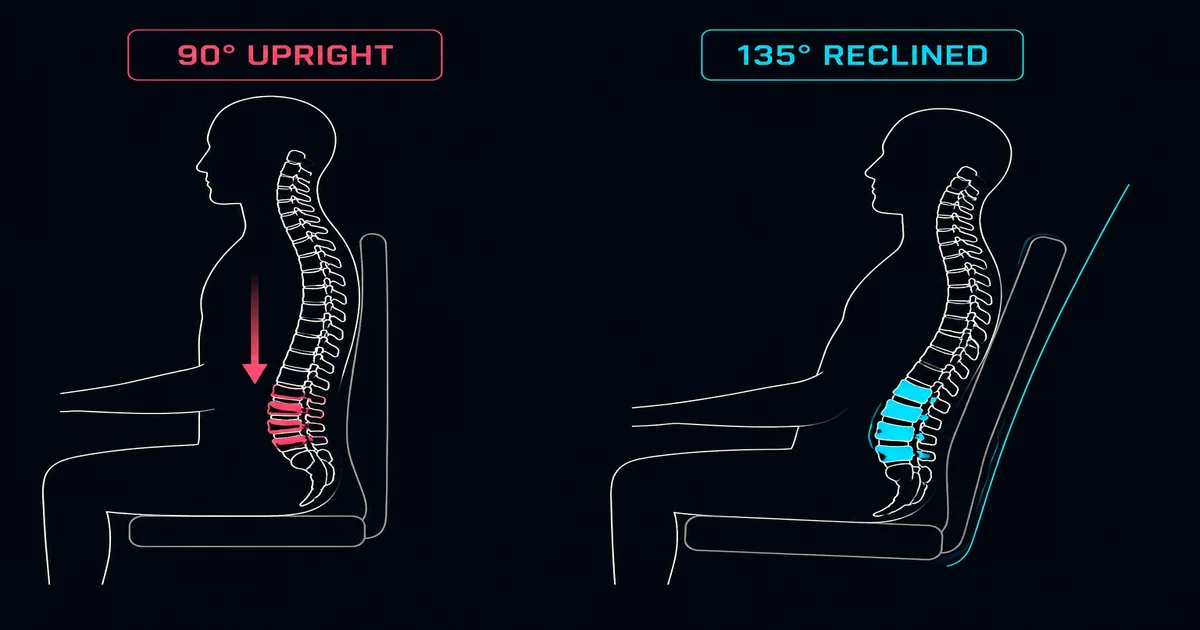
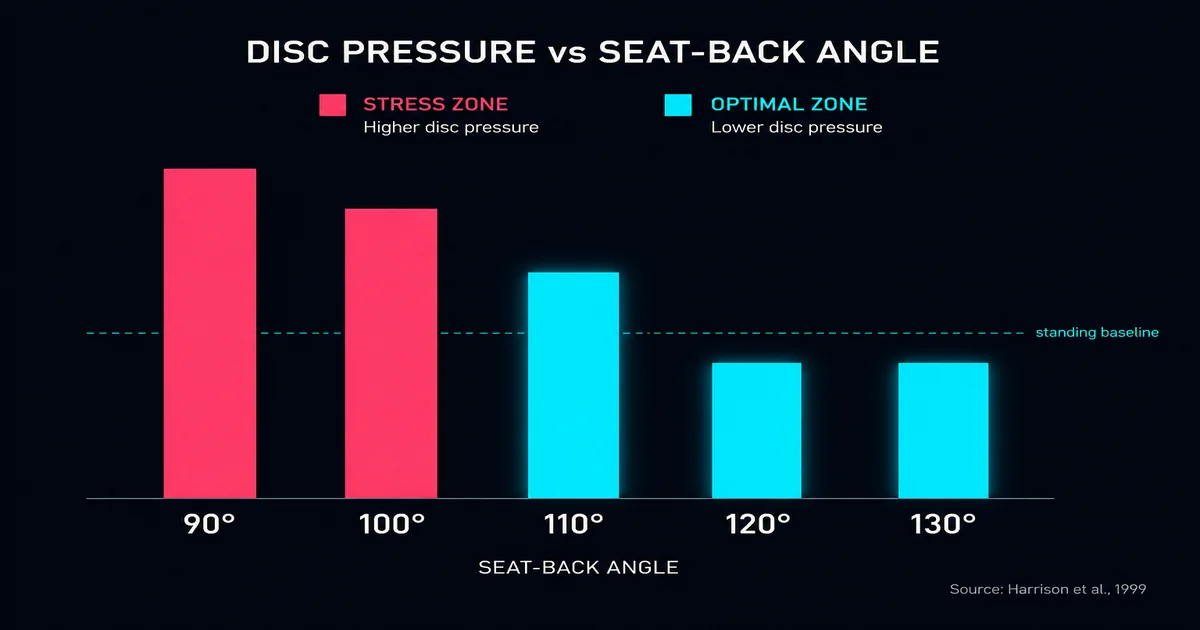
In 2006, researchers at the University of Aberdeen used positional MRI to measure lumbar disc movement across three sitting positions: slouching, 90-degree upright, and 135-degree reclined. The 90-degree upright posture produced the most disc movement while 135-degree reclined produced the least (Bashir et al., Radiological Society of North America, 2006). A separate study found that a seat-back angle of 110-130 degrees with lumbar support produced the lowest disc pressures and lowest spinal muscle activity measured by EMG (Harrison et al., 1999). The evidence converges on a finding that contradicts decades of workplace advice: sitting bolt-upright is not protective. It’s the opposite.
The Real Cost of Getting It Wrong
Those 511,000 cases are work-related musculoskeletal disorders, the second largest category of work-related ill health in Great Britain after stress, depression and anxiety. Back injuries are one part of that total, not the whole of it. What the evidence does say clearly is what helps a desk worker. It just isn’t widely known.
What “Ergonomic” Actually Means
The word “ergonomic” gets slapped on everything from $50 task chairs to $1,500 flagships. For a chair, it means three things: adjustability (the chair moves to match your body), support where you need it (lumbar, seat depth, armrests), and freedom to move. A chair that locks you upright all day, no matter how expensive, fails all three.
How an Ergonomic Chair Works
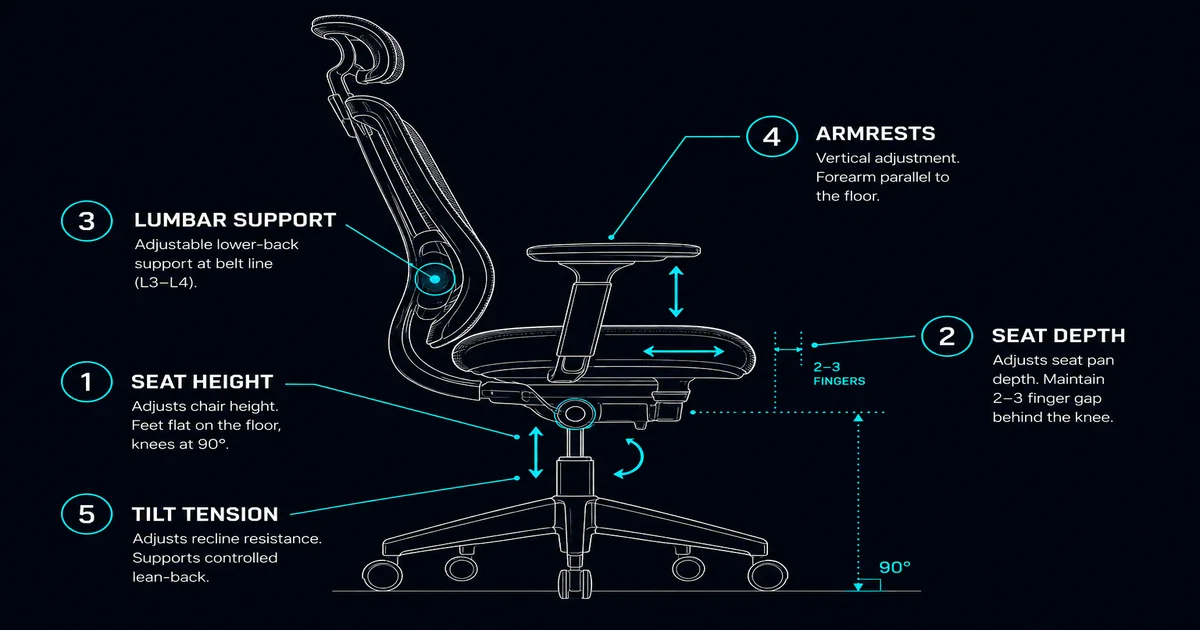
An ergonomic chair isn’t one thing. It’s five independent adjustment systems that work together. Understanding what each one does is the difference between a chair that helps and one you just sit in.
Seat Height and Depth
The pneumatic cylinder controls height. Correct: feet flat, knees at 90-100 degrees (slightly open), thighs parallel to the floor or slightly declined. Per BIFMA G1-2013, you want a 2-3 finger gap between seat edge and the back of your knee. Too deep and the seat presses into your calves, forcing you to slouch. Too shallow and your thighs don’t get enough support.
Seat depth is the most overlooked adjustment in home office setups. Most people never touch it, if their chair even has it. A fixed-depth seat pan that’s too deep is one of the biggest reasons people slouch, and they usually blame themselves for “bad posture” when the chair simply doesn’t fit.
Lumbar Support
Your lumbar support should contact your spine at the L3-L4 level, belt-line height, right in the small of your back. Positioned correctly, it reduces disc pressure and spinal muscle activity (Harrison et al., 1999). But prolonged lordotic sitting, arching against the support for hours, can fatigue the lumbar extensors (O’Sullivan et al., 2012). Lumbar support helps most when used intermittently. It’s a variation tool, not a brace.
Budget chairs typically offer fixed lumbar support at a single height. Mid-range ergonomic chairs add adjustable lumbar depth and height, letting you dial in both position and pressure. That adjustability matters because lumbar depth preference varies with body mass, and people with chair-related back pain tend to choose different support configurations than pain-free users (Coleman et al., 1998).
Armrests
When set correctly, with forearms parallel to the floor and shoulders relaxed, armrests significantly reduce trapezius and anterior deltoid muscle activity compared to unsupported sitting (Goncalves et al., Journal of Electromyography and Kinesiology, 2017). That’s a meaningful offload for muscles that contribute to tension headaches and neck pain when overworked. If your armrests don’t go low enough, you’re better off removing them entirely. Armrests that force your shoulders up are worse than no armrests at all.
Tilt Mechanism
Most quality chairs use a synchro-tilt design: the seat tilts at a 2:1 ratio relative to the backrest, so your feet stay grounded while your back angle opens. Tilt tension controls resistance. Dial it so your body weight holds the recline without effort, what I call the “float point.”
The tilt lock is useful for focused task work. The mistake: locking it upright all day forces the 90-degree static posture that MRI evidence shows produces the most disc movement. Release your tilt for daily work. Recline. Sit up when you need to focus.
Headrest
A headrest is for reclined micro-breaks, not active typing. If you’re using the headrest while working, your neck is probably craning forward to see the screen, and that is more often a monitor height problem than a missing headrest. Don’t pay extra for one unless you know you’ll recline regularly.
How to Set Up Your Chair
Here’s the setup sequence. It takes about three minutes once you know the order, and the order matters more than you’d think. Start from the bottom and work up.
Step 1: Seat Height
Plant both feet flat on the floor. Adjust height until your knees are at 90-100 degrees, slightly open. Your thighs should be parallel to the floor or slightly declined. If your desk is too high for correct chair height, raise the chair until your arms match the desk, then add a footrest. Never sacrifice chair height for desk height. Your spine gets priority over your keyboard.
Step 2: Seat Depth
Sit all the way back against the backrest. Check the gap between the front edge of the seat and the back of your knee. You’re looking for 2-3 fingers of clearance. If your chair has a depth slider, adjust until that gap is right. If your chair doesn’t have depth adjustment and the seat is too deep, you’re stuck. This is why seat depth adjustability is one of the most valuable features when moving up from an entry-level chair. Independent seat depth sliders become standard once you’re past the budget tier.
Step 3: Lumbar Support
Position the lumbar support at belt-line height, the small of your back, roughly L3-L4. Set the depth so you feel gentle contact without being pushed forward. If your lower back is working to maintain contact, the support is too aggressive. If you can’t feel it at all, it needs to come forward or up.
Step 4: Armrests
Adjust height so your forearms are parallel to the floor with your shoulders completely relaxed. Set the width so your arms hang naturally at your sides, not splayed outward or pinned against your ribcage. Your desk surface and armrests should be at the same height so your forearms form one continuous plane from elbow to keyboard.
The same £600 chair set up for someone 5’2″ (~157 cm) and someone 6’4″ (~193 cm) ends up as two completely different chairs. The shorter user needs the armrests at their minimum and often still wants an extra half inch. The taller user needs the seat depth maxed out and the lumbar raised to its highest position. Same chair, both comfortable. It just has to be adjusted for each body.
Step 5: Tilt Tension
Release the tilt lock. Adjust the tension knob until your body weight holds the recline angle without effort. You should be able to lean back without pushing and sit up without the chair snapping forward. Leave the tilt disengaged for daily work. Lock it only for focused task sprints, and even then, release it after 30-40 minutes.
When to Re-Check Your Setup
Chair setup isn’t something you do once and forget. Habits drift. Bolts loosen. A quick re-check is worth doing whenever discomfort creeps back in, after moving house, or after someone else uses their chair. The whole sequence takes three minutes. That’s nothing next to months of back pain from a chair that drifted out of alignment.
The Chair Doesn’t Exist in Isolation
Your monitor’s top third should be at eye level (Cornell University Ergonomics). Your keyboard should sit 1-2 inches from the desk edge with your wrists neutral, not extended upward or downward. Your mouse should be directly beside the keyboard on the same plane. A chair set up perfectly under a desk that’s three inches too high is still a problem.
Sitting Posture: What “Good Posture” Really Means
The 90-Degree Rule Is Wrong
For decades, workplace ergonomics taught people to sit at 90 degrees: 90 at the hips, 90 at the knees, 90 at the elbows. The 2006 positional MRI study I referenced earlier, 22 healthy volunteers, three sitting positions, direct measurement of lumbar disc movement, found that 90-degree upright produced the most disc movement while 135-degree reclined produced the least (Bashir et al., RSNA, 2006).
Harrison et al. (1999) arrived at a converging finding from a different direction: seat-back inclinations of 110-130 degrees with lumbar support produced the lowest intradiscal pressures and the lowest spinal EMG readings. Two independent research groups, two different methodologies, same conclusion: the upright posture taught as “correct” is biomechanically the hardest on your discs. The evidence has been building for 25 years. The advice hasn’t caught up.
According to a 2006 study presented at the Radiological Society of North America, researchers using positional MRI found that lumbar disc movement was most pronounced at a 90-degree upright sitting posture and least pronounced at a 135-degree reclined body-thigh angle, directly contradicting the long-held assumption that sitting bolt-upright protects the spine (Bashir et al., RSNA Annual Meeting, 2006).
Dynamic Sitting: Why Movement Matters More Than Position
Posture variety is more protective than any single “correct” position. The O’Sullivan research group at Curtin University has found repeatedly that people with low back pain sit more statically than pain-free individuals (O’Sullivan et al., Manual Therapy, 2012). A 2026 literature review of 230 papers found that in-chair movement patterns vary by task, seat characteristics, and individual, with frequency, amplitude, and posture changes all shaped by context rather than any universal rule (Kruithof, Song, and Vink, WORK: A Journal of Prevention, Assessment & Rehabilitation, 2026).
In 2019, a landmark paper titled “Sit Up Straight: Time to Re-evaluate” in the Journal of Orthopaedic & Sports Physical Therapy argued that despite the absence of strong evidence linking specific postures to pain, cultural and clinical beliefs about “correct” posture persist (Slater, Korakakis, O’Sullivan et al., JOSPT, 2019). A survey found that 97.5% of physiotherapists couldn’t agree on what “optimal” sitting posture looks like (Korakakis, O’Sullivan et al., 2019). No expert consensus exists. Your best posture is your next posture.
The Surprising Truth About Slouching
A 2026 study by Al Amer et al. found that slouched sitting reduced spinal loading and lumbosacral nerve root compression compared to erect seated positions (Al Amer, Pakkir Mohamed, and Olson, Journal of Back and Musculoskeletal Rehabilitation, 2026). The finding contradicts the “never slouch” rule, but it makes biomechanical sense: brief, relaxed sitting offloads the spinal extensors constantly engaged in upright posture. This doesn’t mean slouch all day. It means rigidity is the problem, not any specific angle.
What About Standing Desks?
A 2019 Cochrane review found “no significant difference” in musculoskeletal symptoms from sit-stand workstation interventions (Parry, O’Sullivan et al., Cochrane Database, 2019). A separate meta-analysis found a small effect on low back discomfort, a standardized mean difference of -0.230 (Agarwal et al., 2018). Standing desks aren’t a bad purchase. Their value is posture variation, not replacing sitting with standing.
The Active Sitting Device Reality Check
The active sitting market is full of products marketed as posture solutions, but the evidence is mostly not on their side. The Balans kneeling chair had its manufacturer claims contradicted directly: “the data do not support the manufacturer’s claim” regarding low back pain reduction (Lander et al., 1987). Stability balls have been studied for metabolic and EMG effects, not pain or posture outcomes (Kumahara et al., 2025). Saddle chairs have been investigated primarily in dentistry, with findings that don’t generalize to desk work. No active sitting device has evidence strong enough to recommend over a properly adjusted standard chair combined with regular movement breaks.
Common Ergonomic Mistakes
Most ergonomic mistakes aren’t about having the wrong chair. They’re about having a chair that was never set up for the person sitting in it, or habits that undo even a perfect setup.
The Chair Setup Mistakes
Seat too high: feet dangle, posterior thighs compress against the seat edge, and you slide forward to reach the floor, collapsing your lumbar curve. This is the most common mistake in home offices, usually caused by setting chair height to match the desk instead of the body.
Seat too low: knees ride above hips, increasing lumbar flexion and disc pressure. Your pelvis tilts backward, flattening the natural curve of your lower spine.
Seat too deep: the seat edge presses into the back of your knees, and the only way to relieve the pressure is to slouch forward. Now your lumbar support is supporting your mid-back instead of your lower back.
Armrests too high: shoulders rise to reach them. Trapezius muscles stay in constant low-grade contraction. Give it an hour and you’ll feel it in your neck. Give it a year and you’ll have tension headaches you don’t connect to your chair.
Armrests too low: you lean to one side to rest an elbow, loading one side of your spine asymmetrically. Asymmetric loading is a major contributor to unilateral back pain, the kind that’s worse on one side.
Lumbar support in the wrong position: too high and it pushes your thoracic spine forward. Too low and it presses into your sacrum, tilting your pelvis backward. Both are worse than no lumbar support at all.
The Behavior Mistakes
Tilt locked upright all day: this forces the 90-degree static posture that MRI evidence shows produces the most lumbar disc movement. Every ergonomic chair has a tilt mechanism. Locking it upright for hours at a time defeats the purpose. If your chair won’t hold a recline without you fighting it, the tilt tension isn’t set right, or the mechanism is too stiff for your body weight. Release the tilt lock, adjust the tension, and let your body move.
Not moving enough: the best chair setup fails if you never change position. Minimum: shift your posture every 20-30 minutes. Stand up and walk every hour. The evidence on posture variety is stronger than the evidence on any single posture. Your chair is a tool for supporting movement, not a cast.
Matching Your Chair to Your Body Type
A chair that fits your body is the difference between sustainable comfort and constant fidgeting. Here’s what to check if you’re not the “average” user chairs are designed for, and most people aren’t.
Height Considerations
If you’re under 5’4″ (~163 cm), your chair’s minimum seat height needs to go below 16 inches (~41 cm). Many standard chairs bottom out at 17 inches (~43 cm) or higher, so your feet won’t reach the floor. Seat depth is even more critical: standard 18-20 inch (~46-51 cm) seat pans are too deep, cutting into your calves and forcing you to perch on the front edge.
If you’re over 6’2″ (~188 cm), you need a seat that goes at least 21 inches (~53 cm) high and a backrest tall enough to support your thoracic spine, not just your lumbar. A backrest that’s too short hits you between the shoulder blades instead of supporting them. Seat depth needs to extend far enough for full thigh support.
Weight and Build Considerations
If you’re under 150 pounds (~68 kg), tilt tension becomes an unexpected issue: many chairs are calibrated for heavier users and won’t recline smoothly. Test before buying. Sit, release the tilt, and make sure the tension adjusts low enough that you can recline without pushing. If you’re over 250 pounds (~114 kg), you need a reinforced cylinder (Class 3 or 4 gas lift), a wider seat pan, and a weight rating that includes a safety margin above your actual weight. Exceed the rating and you risk cylinder failure.
Proportion Oddities
Long torso and short legs? You need independent seat depth and backrest height adjustments. Wide hips and narrow shoulders? Width-adjustable armrests become non-negotiable. Pre-existing back condition? Lumbar support depth adjustability matters. Fixed lumbar support can aggravate extension-sensitive low back pain. Premium ergonomic chairs offer the widest adjustment ranges for body types outside the bell curve, and if you’re dealing with chronic pain, the investment in fit becomes hard to overstate.
Which Chair Tier Is Right For You?
Once you know how a chair should fit, the question becomes: how much chair do you actually need? Here’s what each budget band delivers and who each one is for.
Under $400 / ~£300: The Budget Tier
At this price, you get a height-adjustable seat, basic lumbar support (usually fixed height), 2D armrests, height only and sometimes width, and a tilt mechanism with tension control. What you don’t get: seat depth adjustment, adjustable lumbar depth, synchro-tilt, or a headrest. These chairs work best for first-time ergonomic chair buyers, students, or light users logging under four hours a day.
If you want a shortlist rather than a framework, our best ergonomic office chairs under $400 covers this band.
$400-$800 / ~£300-£600: The Mid-Range Sweet Spot
Full adjustability arrives: seat depth sliders, lumbar with independent height and depth, 3D or 4D armrests, synchro-tilt mechanisms, better foam density, and 5 to 12-year warranties. This tier is also where materials start mattering: high-density foam won’t flatten after a year, and tensioned mesh backs breathe better in warm rooms. This is the value-per-dollar peak. For full-time desk workers logging 6-8 hours a day or anyone who already has back or neck discomfort, mid-range chairs stop being “good for the price” and start being genuinely good.
$800+ / ~£600+: The Premium Investment
Premium chairs add forward tilt, dynamic lumbar that responds to your movement, 4D armrests, mesh or fabric built to last a decade, and 12-year or longer warranties. These chairs last 10-15 years. A £900 chair lasting 12 years costs £75 a year, often less than replacing a £200 chair every two years. For all-day users, people managing chronic back pain, or multi-user households, the premium tier earns its price.
The Short Version
Chair ergonomics isn’t about finding one magic posture. It’s about understanding how your chair works, setting it up for your body, and staying in motion. The evidence is clear: posture variety beats any single “correct” position, a properly adjusted chair offloads your spine in measurable ways, and the chair needs to match your body proportions, not the other way around. Most ergonomic advice hasn’t been updated in decades. The research has moved on. Your setup should too.
← Back to Ergonomics Hub