If you work at a computer and your neck hurts by 3pm, your monitor height is probably wrong. In 2025, a cross-sectional study of 1,777 workers found that working from home was linked to 3.32 times higher odds of neck pain compared to office work (PubMed, 2025). A separate survey found that 60.3% of work-from-home computer users reported neck pain, with 71.2% experiencing it just in the last seven days (Gosain et al., BMC Musculoskeletal Disorders). These are not small numbers. The fix, though, is straightforward: get the height right, and most of that pain goes away.
In a Hurry? Start Here
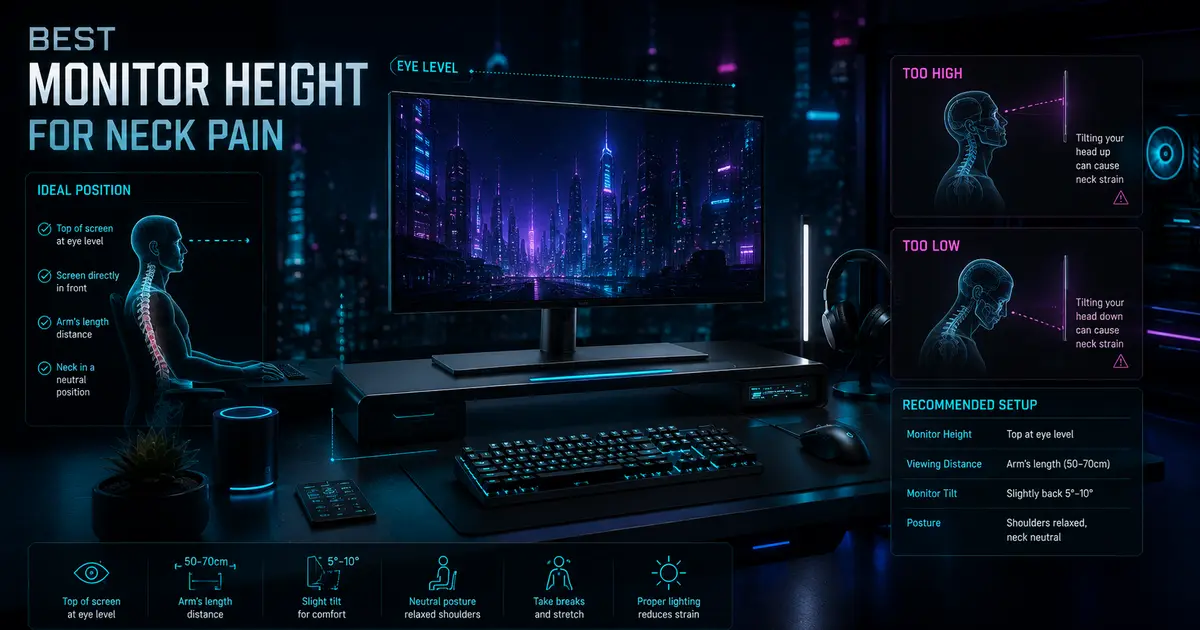
- Top of monitor at eye level — Keeps cervical spine neutral (CCOHS, Cornell CUErgo). Center of screen sits 15–18° below horizontal sight line for nearly zero neck flexion.
- Fix it now, zero tools needed — The arm's-length test and a stack of books find your ideal height in seconds. Give it one full workday to confirm.
- Monitor arm > riser > books — A gas-spring arm gives infinite height adjustment that fixed risers and factory stands can't match, plus frees desk space.
Table of Contents
Disclosure: TechDeskZone is reader-supported. When you buy through links on our site, we may earn an affiliate commission at no additional cost to you. See our affiliate disclosure for details.
I spend my days testing monitor arms, measuring viewing angles, and fixing real desk setups for people who sit at screens for nine hours straight. The single biggest problem I see is not the chair, not the desk, not the keyboard. It is the monitor sitting six inches too low on its factory stand.
Why your monitor height is probably wrong
Your eyes, when you are sitting comfortably and looking straight ahead, define a horizontal line. Everything below that line, your eyes can cover without tilting your head. The normal visual zone spans about 30 degrees total, from 15 degrees above that horizontal line to 15 degrees below it (CCOHS).
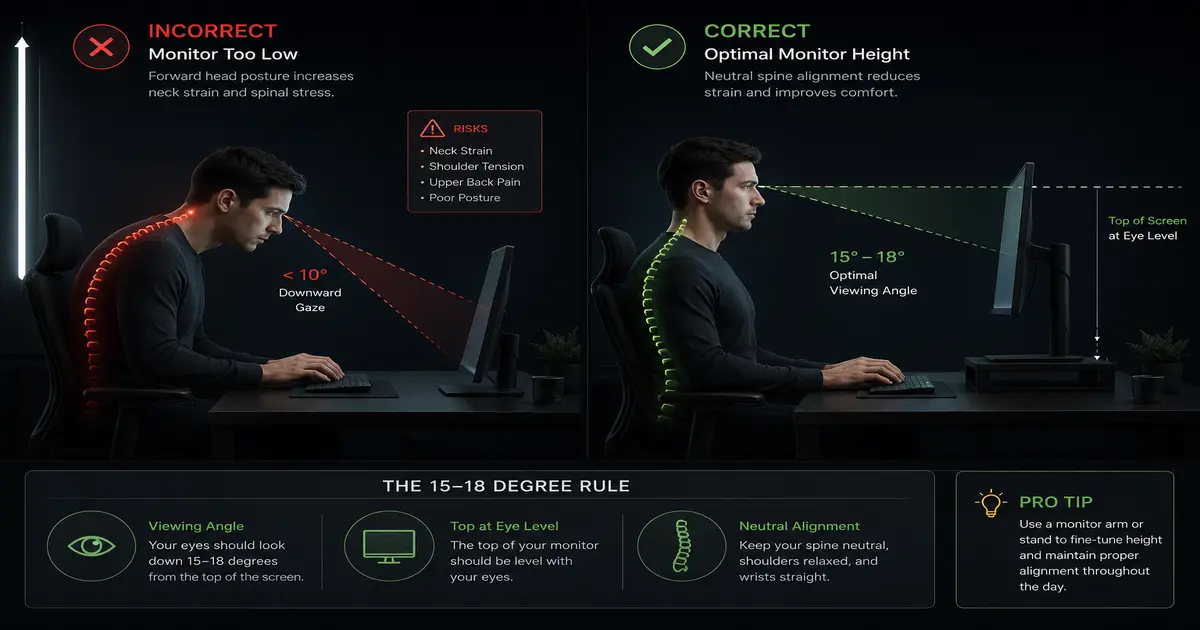
Here is where it falls apart. Factory monitor stands position the center of your screen roughly 6 to 10 inches below eye level for most desk setups. That forces you into forward head posture. Every inch your head tilts forward is often cited as adding roughly 10 pounds of effective load on your cervical spine, a widely-repeated extrapolation from spinal biomechanics research (it traces back to a 2014 analysis by spine surgeon Kenneth Hansraj), though physical therapists debate the exact figure. What is not debated is the direction of the effect: more forward tilt means more sustained muscle work to hold your head up. Over an eight-hour workday, that compounds into chronic tension at the base of your skull, across your traps, and down between your shoulder blades.
A small 2025 study in MDPI Sensors, 15 participants so treat it as suggestive rather than definitive, tracked cervical spine angles across different devices and found that desktop computer use produces neck flexion near neutral, a mean of negative 0.2 degrees. Mobile phone use, by comparison, produced 38.9 degrees of cervical flexion (p less than 0.001). The pain scores tracked the same pattern: 25.3 mm on a visual analog scale for desktop users versus 37.5 mm for mobile users (PMC, 2025).
What this suggests is that a properly positioned desktop monitor is not just better than a phone, it can bring neck flexion close to neutral. The catch is that “properly positioned” does the heavy lifting.
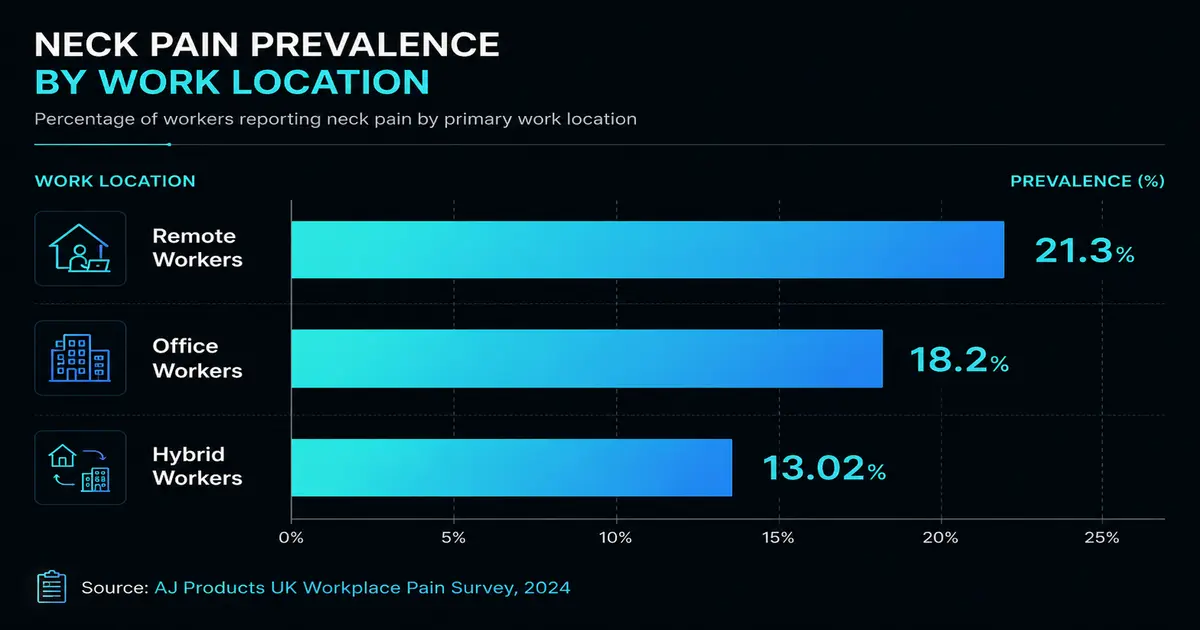
A 2024 UK workplace pain survey of 2,015 adults found remote workers reported the highest rate of daily neck, back, and shoulder pain at 21.3%, compared to 18.2% for full-time office workers and 13.02% for hybrid workers (AJ Products UK Workplace Pain Survey). The home setup, stripped of the ergonomic adjustments most offices provide, is the culprit.
What is the exact monitor height that fixes neck pain?
Four independent government and academic sources converge on the same guidance. The Canadian Centre for Occupational Health and Safety says the center of your screen should sit at 15 degrees below your horizontal line of sight, with the top of the screen never higher than eye level. Cornell University ergonomics lab specifies 17 to 18 degrees below horizontal, with your eyes aligned to a point 2 to 3 inches below the top of the monitor casing. The UK Health and Safety Executive states “top of screen level with eyes.” OSHA computer workstation guidelines say “top of monitor at or just below eye level.”
These are not competing recommendations. They are the same rule, described with slightly different precision depending on whether the source is writing for a safety inspector or a university researcher.
The reason this specific height works is biomechanical. When your eyes look downward at 15 to 18 degrees, your head stays balanced directly over your spine. Your neck muscles do not need to contract as hard to hold the weight of your head, which sits around 10 to 12 pounds on its own. Drop the monitor 6 inches lower and you add forward tilt, which increases the load your neck muscles and cervical discs have to support well beyond that resting weight. That is the difference between finishing a workday feeling fine and finishing it with a headache radiating up from your neck.
Viewing distance matters too. The same sources agree on arm length, roughly 20 to 30 inches depending on your height and the screen size. Extend your arm while seated. Your fingertips should touch the screen. If they do not reach, the monitor is too far and you will lean forward to see detail. If your palm hits, it is too close and your eyes will strain to focus.
For a deeper dive into setting up every piece of your workstation, see our complete ergonomic home office setup guide.
How to measure and fix your monitor height right now
You do not need a tape measure. You do not need special tools. Sit in your chair the way you normally work, with your back against the backrest and your feet flat on the floor. Look straight ahead at the wall in front of you. Whatever part of your monitor lines up with your gaze is the answer.
If your eyes land on the middle of the screen, the monitor is too low. If your eyes land on the top third or above, you are close. The target is simple: when you look straight ahead, your eyes should meet a point about 2 to 3 inches below the top edge of the screen casing.
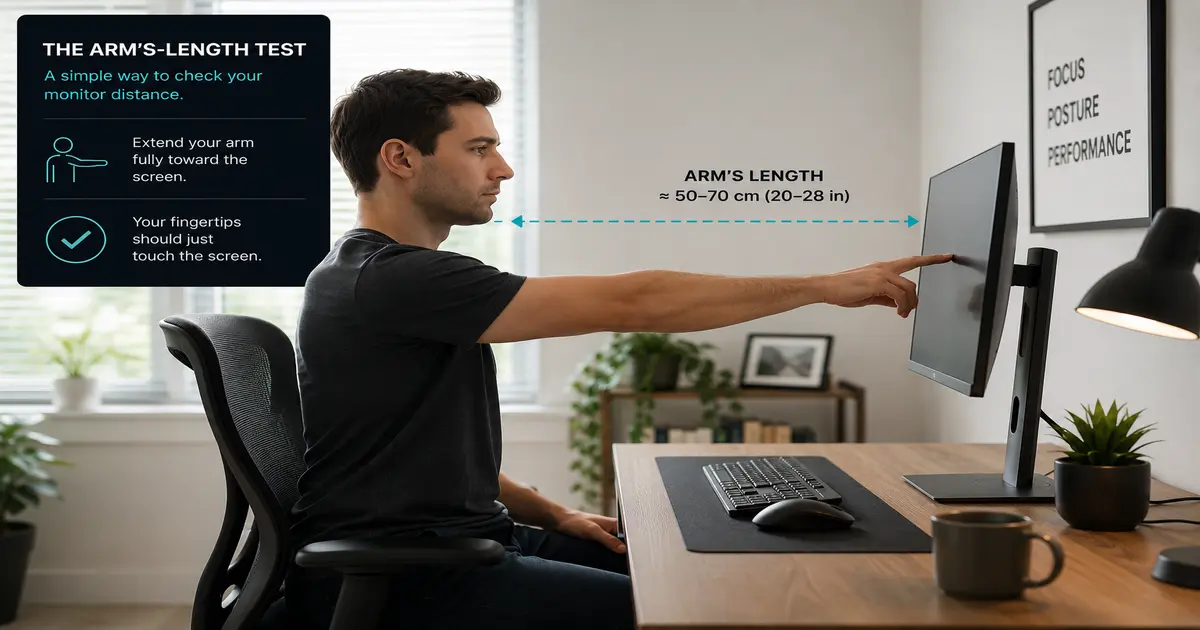
The quickest way to raise a monitor that is too low is a stack of books or a ream of printer paper. It sounds cheap, but it works, and it lets you test different heights before spending money. Raise the monitor until the top edge sits at eyebrow level, then lower it slightly so your straight-ahead gaze meets that 2-to-3-inches-below-top point. Work for an hour and check how your neck feels.
A common reaction at this stage: the monitor now feels too high. It is not. It is just higher than you are used to. Give it a full workday. Your neck will tell you whether it is right.
If you use a laptop as your primary screen, you have a harder problem. Raising a laptop to eye level puts the keyboard at an unworkable angle. The only real fix is an external monitor, or at minimum an external keyboard and mouse paired with a laptop stand. I have seen people spend months in physiotherapy for neck pain that would have been solved by a $40 laptop stand and a $20 keyboard. The same principle applies to wrist pain from poor desk posture, fixing the foundation first prevents problems from compounding.
Our best standing desk roundup for 2026 covers desks with built-in height adjustability, which makes dialing in monitor position far easier than stacking books.
Monitor arms, stands, and risers: what actually helps
Monitor arms have become the default upgrade for anyone serious about fixing their setup, and for good reason: they solve what factory stands cannot.
A gas-spring monitor arm gives you three things books cannot. First, one-handed height adjustment. You can pull the monitor up or push it down without tools, which means you can actually experiment with different heights throughout the day. Second, depth adjustment. Arm length is not a fixed number for every task. Reading long documents benefits from a slightly different distance than editing spreadsheets. Third, your desk surface back. The factory stand footprint, gone.
Fixed-height risers and monitor shelves sit in the middle ground. They cost $30 to $60, they raise the monitor by a set amount, and they do not move. If you have measured your ideal height and a riser hits it exactly, great. If not, you just traded one wrong height for another.
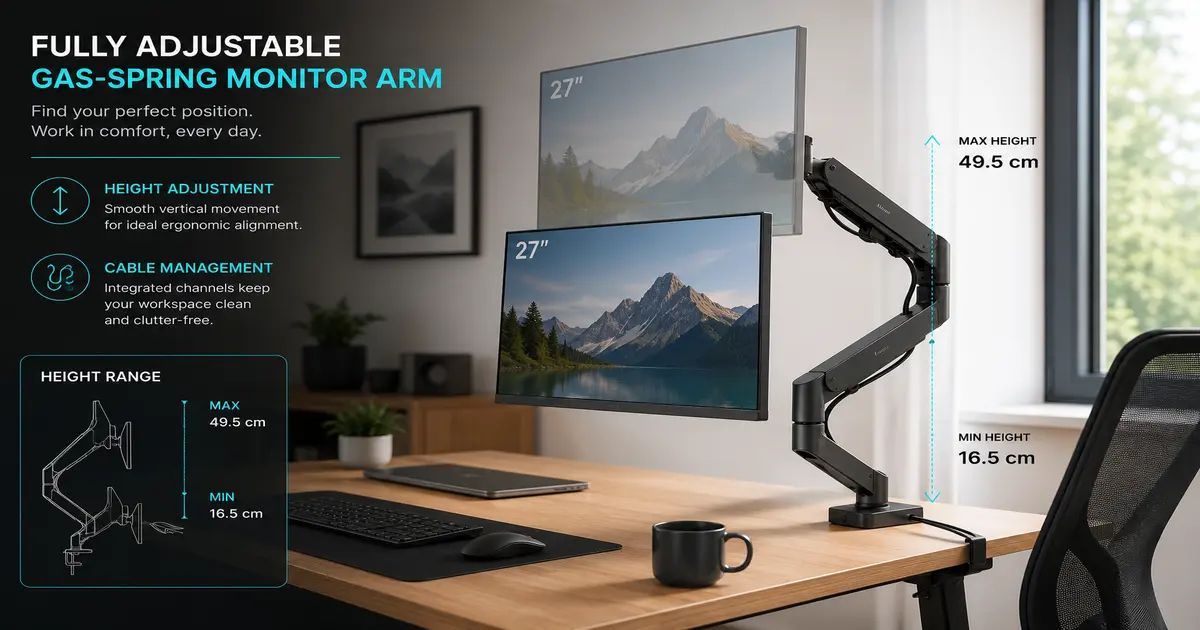
I have tested monitor arms ranging from $40 budget options to $300 professional models. The key difference is not build quality at this point. Even budget gas-spring arms hold monitors steady. The difference is weight range and clamp compatibility. If you have a thick desk edge or a lightweight portable monitor, check the specs before buying.
For dual monitor setups, the rule changes slightly. Your primary screen, the one you look at most, follows the same top-of-screen-at-eye-level rule and sits centered in front of you. The secondary screen goes to one side, angled inward, with its top edge aligned to the primary monitor top edge. If you use both screens equally, split the difference and center the gap between them.
Our best monitor arm roundup for 2026 covers specific models across price points, including dual-arm options and models that handle ultrawide displays.
What common mistakes keep you in pain?
Tilting the monitor up instead of raising it. This is the number one workaround I see, and it does not work. Tilting changes the focal plane but does nothing for the neck angle. Your head still tilts forward to meet the screen. The tilt also introduces glare from overhead lights. Raise first, then adjust tilt for reflection control, not neck compensation.
Setting the monitor too high. Some people hear “raise your monitor” and go too far. A monitor set above eye level forces your neck into extension, tilting your head back to look up. Extension can compress the suboccipital nerves and cause a different kind of headache, at the top of the head rather than the base of the skull. The fix is simple: if you catch yourself lifting your chin to read the top of the screen, lower the monitor an inch.
Using the laptop screen as a primary display. A laptop screen sits roughly 10 to 12 inches below eye level on a standard desk. That guarantees 30-plus degrees of neck flexion, right in the danger zone that the MDPI kinematics study linked to higher pain scores. If you work from a laptop full time, an external monitor is the single most impactful ergonomic upgrade you can make.
Locking your knees and perching at the front of the chair. Monitor height only works if your seated posture starts from the right place. Back against the backrest, shoulders relaxed, feet flat. If you perch forward, you change your eye height by 2 to 3 inches, and every measurement in this guide breaks.
Our ergonomic office chair adjustment guide walks through getting the foundation right before you touch the monitor.
Once your monitor is at the right height, the rest of your workspace matters just as much — see our complete best home office setup guide for monitor placement, desk ergonomics and cable routing.
Sources
- Gosain et al., “Prevalence of musculoskeletal pain among computer users working from home during COVID-19,” BMC Musculoskeletal Disorders, 2022, PMC. Data: 60.3% neck pain prevalence among WFH computer users (n=121). Retrieved 2026-07-29.
- PubMed / Wolters Kluwer, “Association between working from home and neck pain: a 3-year cross-sectional survey of 1,777 workers,” 2025 (n=1,777), PubMed. Data: OR 3.32 for neck pain when WFH. Retrieved 2026-07-29.
- AJ Products UK, “Workplace Pain Survey,” 2024 (n=2,015), reported via Employer News. Data: 21.3% daily neck/back/shoulder pain, remote workers most affected. Retrieved 2026-07-29.
- CCOHS (Canadian Centre for Occupational Health and Safety), “Office Ergonomics – Positioning the Monitor,” current, CCOHS. Data: 15-degree viewing angle, top of screen not above eye level. Retrieved 2026-07-29.
- Cornell University Ergonomics (CUErgo), “Ergonomic Guidelines for Computer Workstations,” current, Cornell. Data: 17-18 degree viewing angle, eyes 2-3 inches below top of casing. Retrieved 2026-07-29.
- HSE UK, “Working safely with display screen equipment,” current, HSE. Data: top of screen level with eyes, arm length distance. Retrieved 2026-07-29.
- OSHA, “Computer Workstations eTool – Good Working Positions,” current, OSHA. Data: top of monitor at or just below eye level. Retrieved 2026-07-29.
- “Cervical spine kinematics during desktop vs. mobile device use,” MDPI Sensors, 2025 (n=15), PMC. Data: desktop cervical flexion -0.2 degrees vs. mobile 38.9 degrees (p less than 0.001). Retrieved 2026-07-29.
- “Predicting mechanical neck pain intensity in computer professionals,” Frontiers in Public Health, 2024 (n=75), Frontiers. Data: 69% of computer professionals reported moderate neck pain. Retrieved 2026-07-29.
- Grand View Research / IndustryToday, “Monitor Arm Market to Grow at 6.73% CAGR from 2025 to 2032,” 2025, IndustryToday. Data: $2.49B (2024) to $4.2B (2032). Retrieved 2026-07-29.
- HSE UK, “Health and Safety Statistics 2024-2025,” HSE. Data: 511,000 workers with work-related MSDs, 40.1 million working days lost. Retrieved 2026-07-29.
Updated: 29 July 2026. Health and safety guidelines from CCOHS, Cornell, HSE, and OSHA are periodically revised. Check source links for the latest versions.
The Verdict
Bottom line: Incorrect monitor height is the single most common and most fixable cause of work-related neck pain. Setting the top of your screen at eye level with a 15–18° downward viewing angle eliminates the forward head posture that drives cervical strain over an eight-hour workday.
Quickest fix: A stack of books or a ream of printer paper raises any monitor to eye level in seconds at zero cost. Test it for one full workday before buying anything.
Best permanent fix: A gas-spring monitor arm. It gives infinite vertical adjustment, clears desk space, and works seamlessly with a standing desk for sit-stand ergonomics.
← Back to Ergonomics Hub