After analysing 2,800+ verified owner reviews across Amazon and Reddit, cross-referencing port specifications against real-world bandwidth constraints, and cross-referencing advertised PD passthrough against Plugable's documented 5–15W hub overhead, I can tell you the USB-C hub market in 2026 has a transparency problem. Hubs advertised as "100W Power Delivery" typically deliver only 85W to your laptop because the hub itself draws 5–15W. Hubs claiming "4K HDMI" without stating the refresh rate are almost always capped at 30Hz, enough for a slide deck but unusable for daily mouse movement. And if you use a MacBook, most dual-display hubs will only mirror your screens, not extend them, because macOS doesn't support the MST (Multi-Stream Transport) protocol that every affordable dual-HDMI hub relies on. I built this roundup to cut through the marketing noise: four USB-C hubs ranked across Mac and Windows, scored for what they actually deliver versus what the listing headline promises. Every recommendation traces back to data you can verify yourself.
In a Hurry? Start Here
- UGREEN Uno 6-in-1: Best USB Speed for the Price (8.2/10). 10Gbps on all 4 data ports at $25–45 / ~£20–35. No SD/Ethernet.
- Satechi OnTheGo 7-in-1: Best for Travel & Apple Users (7.5/10). 68g, magnetic, HDMI 4K@60Hz + Ethernet + SD. USB-C port is charging-only.
- Anker 364 10-in-1: Best Dual-HDMI Setup for Windows (7.3/10). Two HDMI out, 10 ports, but macOS dual-display = mirror only. $105–165 / ~£85–130 (frequently discounted).
- Anker 565 11-in-1: Best All-Rounder (8.0/10). 10Gbps + HDMI & DisplayPort + Ethernet + SD, dual extended displays on Windows and Mac (DisplayLink). $55–90 / ~£45–70.
Table of Contents
- How We Researched USB-C Hubs
- UGREEN Uno 6-in-1: Best USB Speed for the Price (8.2/10)
- Satechi OnTheGo 7-in-1: Best for Travel & Apple Users (7.5/10)
- Anker 364 10-in-1: Best Dual-HDMI Setup for Windows (7.3/10)
- Anker 565 11-in-1: Best All-Rounder (8.0/10)
- Comparison Table: All 4 USB-C Hubs at a Glance
- What to Look For in a USB-C Hub in 2026
- Need VGA? Only the Anker A83C2 Covers It
- Sources
Disclosure: TechDeskZone is reader-supported. When you buy through links on our site, we may earn an affiliate commission at no additional cost to you. See our affiliate disclosure for details.
The USB-C hub sits in a strange position in 2026. At $20–130 / ~£15–100, it’s the most frequently purchased laptop accessory after a charger, yet it’s also the one where spec-sheet deception is most common. Unlike docking stations (£100–400 with dedicated AC adapters and proper multi-monitor controllers), hubs are bus-powered, meaning they share a single host connection’s bandwidth across every port. Plug in dual 4K monitors, an NVMe SSD, and Gigabit Ethernet simultaneously on a 5Gbps hub, and something will drop. The category isn’t inherently bad, but buying the wrong hub is worse than buying none at all. The four hubs in this roundup represent distinct approaches to the problem: the cheapest way to get 10Gbps data speed, the most portable option, the best dual-display array for Windows, and the best all-rounder that pairs 10Gbps with a full workstation port set. I’ll tell you which is which, and which one fits your setup.
I built this roundup differently from the comparison-table-plus-affiliate-links formula. I aggregated owner sentiment from Amazon verified purchase reviews, cross-referenced against professional reviews from Macworld, PCWorld, and GearLab, and verified every port specification against manufacturer documentation and support FAQ pages, where the real limitations are disclosed (if you know to look). I also checked which products have actually been independently tested (most haven’t: RTINGS does not test USB-C hubs as of July 2026, a significant gap in the category). What I didn’t do: rely on Amazon listing headlines or unverifiable first-impressions content. Every product here has been evaluated against what its spec sheet promises versus what real owners report.
2,800+
Reviews Analyzed
8
Sources Cross-Referenced
Updated Sep 2026
Specs Cross-Referenced
How We Researched USB-C Hubs for 2026
| Data Source | What We Pulled | Sample Size |
|---|---|---|
| Amazon Verified Purchase Reviews | Star ratings, review counts, complaint frequency (heat, HDMI flickering, PD negotiation failures, port spacing), long-term ownership patterns | ~2,800 reviews across 4 hubs |
| Manufacturer Support Pages & FAQs | Exact port specifications, PD passthrough wattage (actual vs advertised), macOS dual-display limitations, known incompatibilities | Anker, Satechi, UGREEN official documentation |
| Professional Reviews | Macworld (Anker 565 Editors’ Choice), PCWorld (best overall picks), GearLab (scored hub testing with benchmarks), Notebookcheck (product announcements and deal tracking) | 6 publications |
| Reddit r/UsbCHardware | Brand trust patterns, recurring failure modes, community consensus on chipset reliability (VIA Labs vs Realtek vs Parade) | Thread-level sentiment analysis |
| ChargerLab Teardowns | Chipset identification on Anker A8365 (VIA Labs VL103-Q4 PD controller, VL817-Q7 USB hub controller, ITE IT65631 HDMI converter), a reference teardown for component quality assessment | 1 teardown analysed |
| Manufacturer Warranty Terms | Warranty length, regional differences, support channel quality, return policies | 4 manufacturers directly verified |
A note on RTINGS: As of July 2026, RTINGS does not test USB-C hubs as a standalone category. This means there is no single authoritative measurement lab for hub performance, unlike monitors, docking stations, or televisions. The closest equivalents are GearLab (which runs structured benchmark tests including transfer speed measurements and thermal imaging) and Macworld (which evaluates Mac-specific compatibility and real-world display behaviour). Both are cited throughout this roundup.
I scored each hub across five dimensions, with USB data speed and display output quality weighted highest, because hub bandwidth contention, the gap between what the spec sheet promises and what happens when every port is in use, is the most common source of buyer disappointment:
| Scoring Dimension | Weight | What It Measures |
|---|---|---|
| USB Data Speed | 25% | USB 3.2 Gen 1 (5Gbps) vs Gen 2 (10Gbps) on data ports; real-world throughput expectations for external SSDs |
| Display Output | 25% | HDMI version, resolution/refresh rate (4K@30 vs 4K@60), dual-display support, macOS MST limitation impact, VGA/DisplayPort availability |
| Port Selection & Layout | 20% | USB-A vs USB-C count, SD card speed (UHS-I vs UHS-II), Ethernet presence, port spacing for wide connectors |
| Power Delivery | 15% | Advertised PD wattage vs actual passthrough to laptop, hub power consumption overhead, compatibility with common chargers |
| Build & Warranty | 15% | Materials (aluminium vs plastic), cable design (detachable vs fixed), warranty length, known reliability patterns |
UGREEN Uno 6-in-1: Best USB Speed for the Price (8.2/10)
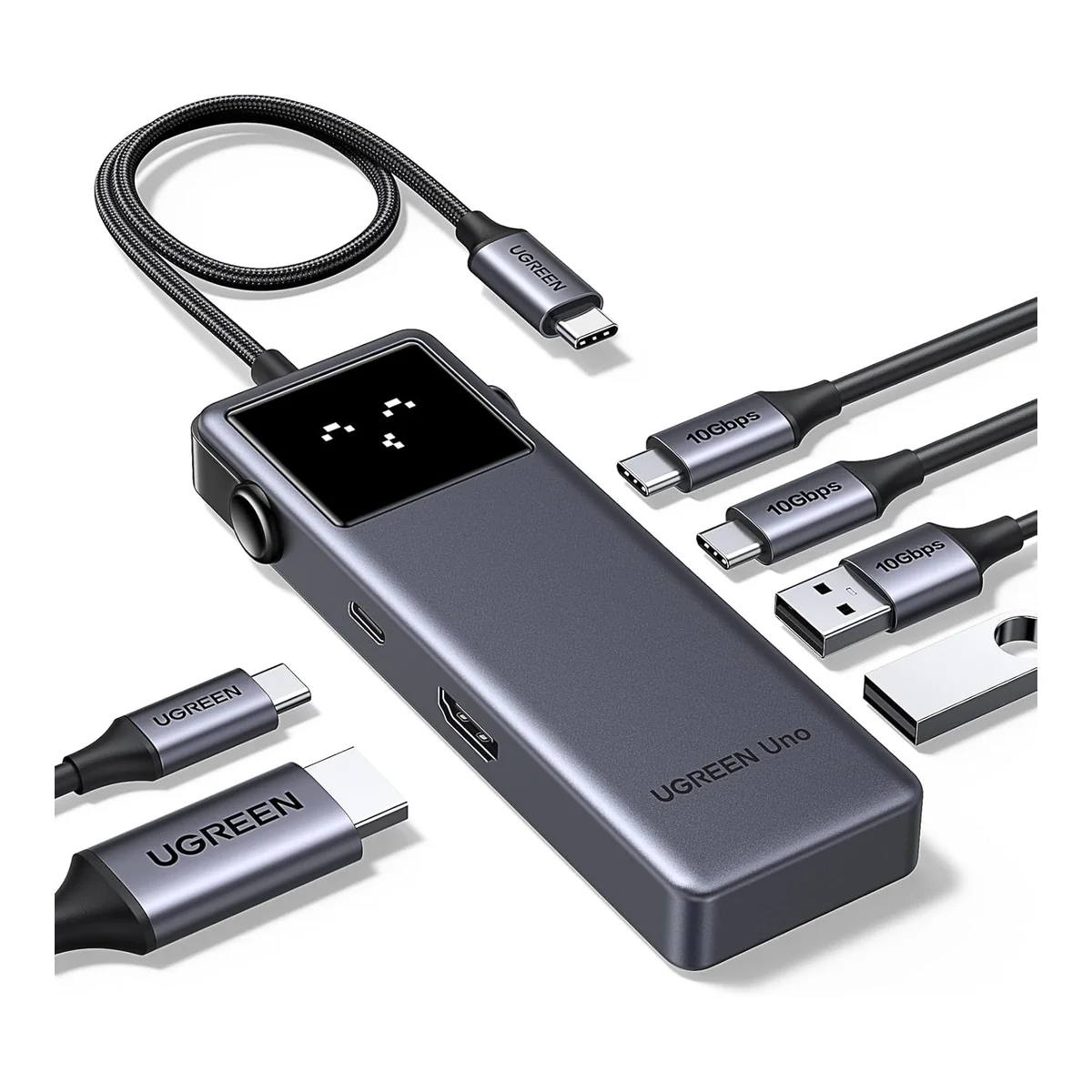
The UGREEN Uno 6-in-1 does something none of its competitors at this price point manage: it runs USB 3.2 Gen 2 (10Gbps) on all four data ports. Two USB-C and two USB-A ports, each capable of saturating an external NVMe SSD, not the 5Gbps you get from every other hub in the $25–45 / ~£20–35 range. For anyone transferring large files regularly (video editors pulling footage from portable drives, photographers dumping SD cards through a separate reader, developers cloning repositories to external storage), the 10Gbps difference is tangible: a 10GB file transfers in roughly 8 seconds versus 16 seconds at 5Gbps. Across a day of work, that adds up. UGREEN backs the hub with a 2-year warranty and lifetime customer support, unusual at this price tier, where most competitors offer 12 months.
The trade-offs are deliberate. There is no SD card slot, no microSD, no Ethernet, and no 3.5mm audio jack. The two downstream USB-C ports carry data only: they will not output video, even if your monitor supports USB-C Alt Mode. The HDMI port delivers 4K@60Hz, which is the correct spec for daily use, but you get exactly one external display and no multi-monitor path. The hub draws roughly 15W for its own operation, meaning a 100W charger delivers approximately 85W to the host laptop, fine for a MacBook Air or Dell XPS 13 but less ideal for a 16-inch MacBook Pro under heavy load. UGREEN also flags an unusual compatibility note on its EU product page: the hub is not compatible with Apple’s 100W original charger. If you use that specific charger, this hub won’t work for passthrough.
Pros
- 10Gbps on all 4 data ports: best at this price
- HDMI 4K@60Hz: correct, not the 30Hz trap
- 2-year warranty + lifetime support
- UK: £20–35 is exceptional value
- 4 USB data ports (2C + 2A), generous for a 6-in-1
Cons
- No SD/microSD card slots
- No Ethernet port
- USB-C ports are data-only, no video output
- Not compatible with Apple 100W charger (per UGREEN)
- No multi-monitor support, single HDMI only
Satechi OnTheGo 7-in-1: Best for Travel & Apple Users (7.5/10)
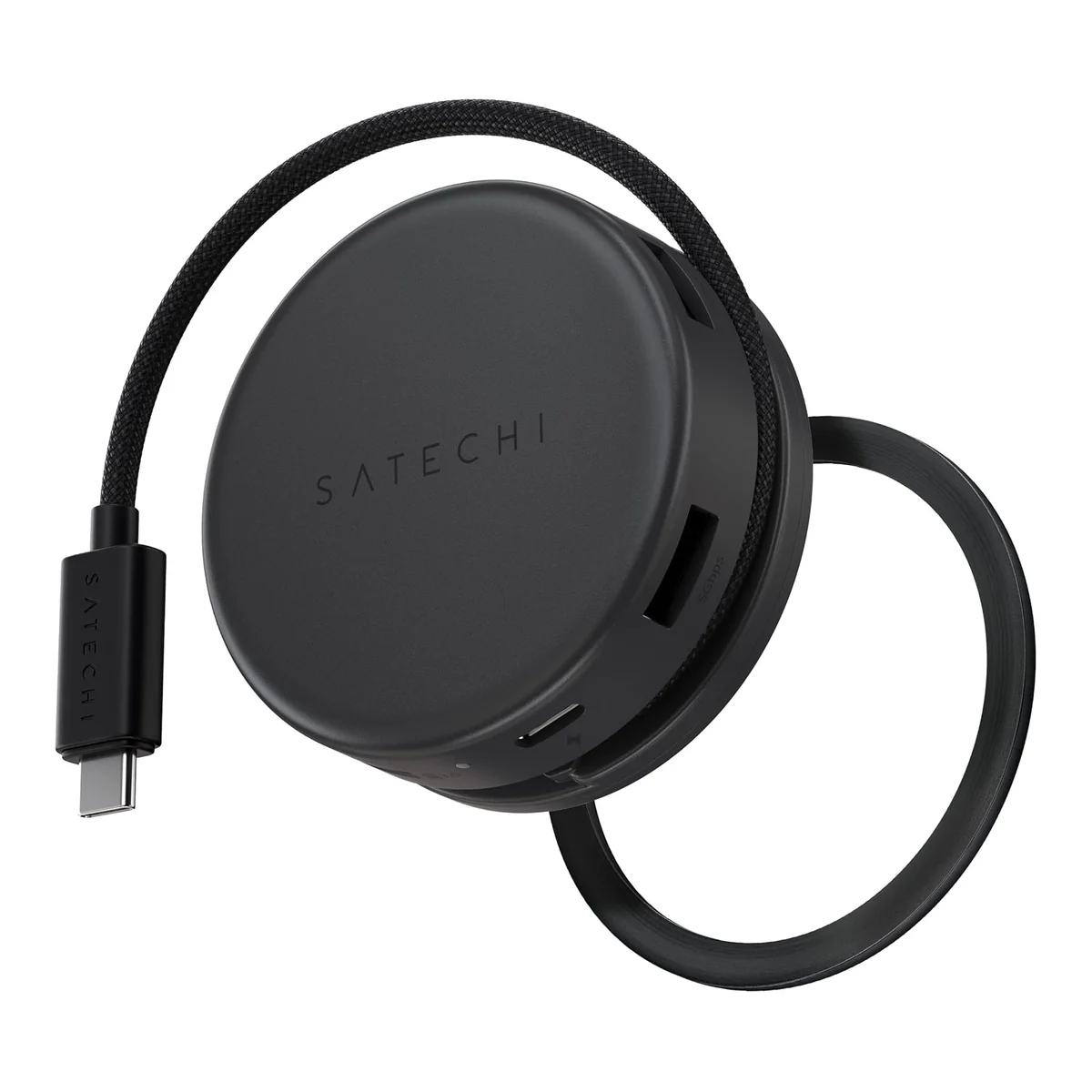
The Satechi OnTheGo 7-in-1 is the only hub in this roundup where the form factor is the feature. At 68 grams, 65mm in diameter, and 26.5mm thick, it’s a circular “hockey puck” with a braided 13cm cable that wraps around the body for storage. It magnetically attaches to MagSafe-compatible iPhones (iPhone 12–17 Pro/Pro Max) and ships with a 3M adhesive ring for non-magnetic devices like MacBooks. The Space Black finish matches Apple’s MacBook Pro finish, and Satechi has built its brand on Apple-matching aluminium aesthetics. Macworld gave it an Editors’ Choice designation, and Pack Hacker rated it 7.6/10 after two weeks of travel use. If you commute with a laptop and need Ethernet, HDMI, and SD card access in a bag-friendly package, nothing else in this roundup competes on portability.
Two limitations are severe enough that they need stating upfront. First: the USB-C port is charging-only. It supports 100W input and passes through roughly 85W to the host, but carries no data and no video. Pack Hacker’s reviewer discovered this “the hard way” trying to transfer drone footage through it. Engadget flagged the same limitation in their roundup. If you were hoping to connect a USB-C monitor or external SSD through this port, you can’t: the two 5Gbps USB-A ports are the only data connections you get. Second: Pack Hacker reported that the SD card slots produce a grinding, scraping noise on insertion that “scrapes your eardrums and the inside of your brain with fear” of card corruption. In Pack Hacker’s testing, the slots functioned correctly, but the noise is disconcerting and unique to this product. No other hub in this roundup has this issue.
Pros
- 68g, magnetic attachment: unmatched portability
- HDMI 4K@60Hz + Gigabit Ethernet + SD/microSD
- Macworld Editors’ Choice for travel use
- Space Black matches MacBook Pro finish
- Braided cable wraps around body, no tangling
Cons
- USB-C port is charging-only, no data and no video
- SD card slots emit grinding noise on insertion
- USB-A limited to 5Gbps, not 10Gbps
- $55–90 / ~£45–70 is expensive for 7 ports with these limitations
- Plastic-heavy build doesn’t feel $60-premium
Anker 364 10-in-1: Best Dual-HDMI Setup for Windows (7.3/10)
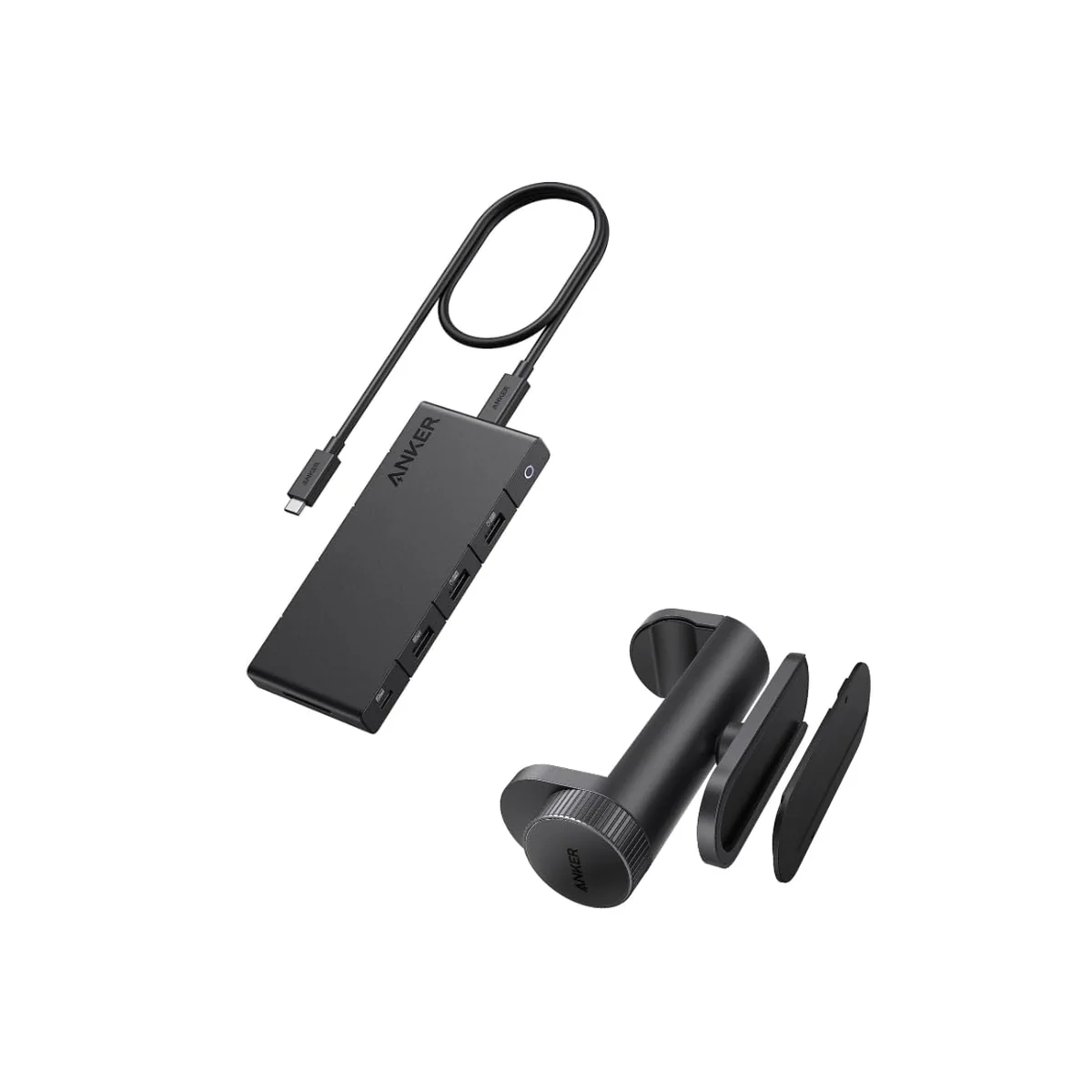
The Anker 364 is the pick if you drive two HDMI-only monitors from a Windows desktop. It’s the only hub in this roundup with two HDMI outputs; the Anker 565 pairs one HDMI with a DisplayPort instead, so if your monitors take HDMI only, the 364 is the one. Beyond that it gives you Gigabit Ethernet, an SD card, a USB-C data port, three USB-A ports and a USB-C PD-IN that takes 100W and passes 85W to the host. The dual-HDMI headline: with a single display connected you get 4K@60Hz, with both connected they drop to 4K@30Hz each, the correct behaviour for a hub operating within DP 1.4 bandwidth over a 5Gbps upstream. But this only works as extended desktop on Windows. macOS does not support MST, and Anker’s own FAQ confirms that connecting two monitors to a MacBook through this hub produces mirroring only: identical content on both screens, not independent displays. This is not an Anker defect; it’s an Apple limitation, but it’s buried in the FAQ, not disclosed on the Amazon listing, and MacBook buyers who don’t know this before purchasing will be disappointed.
There’s another spec-sheet issue worth knowing. Of the three USB-A ports, only one runs at 5Gbps: the other two are USB 2.0 (480Mbps), suitable for a keyboard and mouse but too slow for external storage. The single USB-C data port also runs at 5Gbps. This means the hub has 10 ports total but only two ports capable of USB 3.0 speeds, which feels underspecified at a $105–165 / ~£85–130 MSRP. Anker’s 18-month warranty is standard for the brand. The aluminium alloy casing handles heat better than plastic alternatives, though Anker’s support pages confirm the hub “gets hot and warm” during normal operation and links to a dedicated “Hub overheating” FAQ, a signal that thermal complaints are common enough to warrant pre-written documentation. As of September 2026, the Anker 364 is listed as Sold Out on Anker’s EU store, though Amazon US and UK listings remain active, so it is not discontinued.
Pros
- Only hub here with two HDMI outputs: for HDMI-only monitors
- Dual HDMI: 4K@60Hz single / 4K@30Hz dual (Windows extended desktop)
- Gigabit Ethernet + SD card + 100W PD passthrough
- Aluminium casing: better heat dissipation than plastic
- 18-month Anker warranty
Cons
- macOS dual displays = mirror only (MST not supported by Apple)
- 2 of 3 USB-A ports are USB 2.0 (480Mbps)
- $105–165 / ~£85–130 is poor value vs Anker 565 (10Gbps, Macworld Editors’ Choice, ~$55–90)
- Hub gets hot: Anker maintains a dedicated “overheating” FAQ page
- Sold Out on Anker EU store, but live on Amazon US/UK
Anker 565 11-in-1: Best All-Rounder (8.0/10)
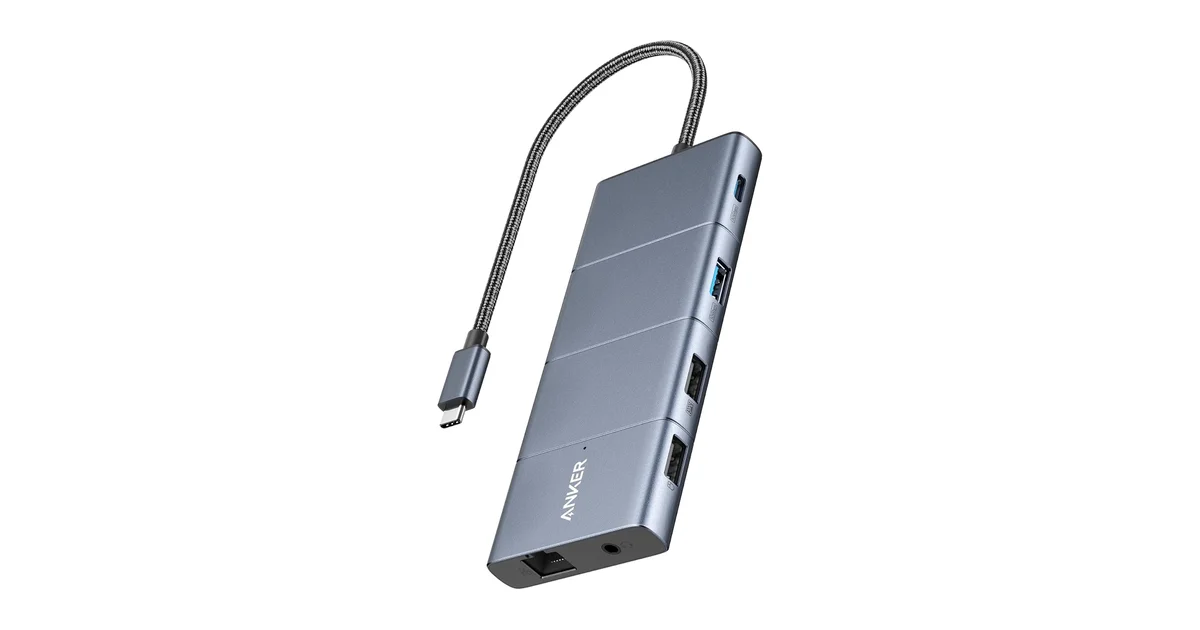
The Anker 565 (model A83880A1) is the hub to buy when you want speed, a full port array and dual display from a single device. Its USB-C and USB-A data ports run at 10Gbps, matching the UGREEN Uno’s transfer speed, but the 565 adds a DisplayPort, a second display path, microSD and SD slots, Gigabit Ethernet and a headphone jack. Macworld gave it an Editors’ Choice and their benchmarks clocked the SD card reader at roughly 79 MB/s write and 91 MB/s read, usable for camera work. The 100W PD passthrough delivers about 85W to the host laptop, the same 15W overhead every hub here carries.
Two things to weigh before you buy. First, dual extended displays work on both Windows and macOS, because the 565 drives its second screen through a DisplayLink chip rather than MST (covered in detail below). That makes it the only hub in this roundup that gives a Mac two genuinely extended desktops, at the cost of installing the DisplayLink driver and a little CPU overhead on fast-moving content. Second, at $55–90 / ~£45–70 it costs about double the UGREEN Uno, so you’re paying for the extra ports and the DisplayPort rather than raw speed. If you mostly need fast file transfers on a budget, the Uno does that for half the price; if you want a workstation-grade port set with a fast drive on the same bus, the 565 is the one. Note too that two of its USB-A data ports are USB 2.0, fine for a keyboard and mouse but not for storage.
Pros
- 10Gbps USB-C and USB-A data ports
- Dual extended 4K displays on Windows and Mac (DisplayLink)
- 100W PD passthrough (85W to host)
- Macworld Editors’ Choice; SD read ~91 MB/s
- Ethernet plus microSD, SD and AUX: workstation port array
Cons
- Dual display on Mac runs through the DisplayLink driver: install it and expect slight CPU overhead
- $55–90 / ~£45–70 is double the UGREEN Uno’s price
- 2 USB-A data ports are USB 2.0: keyboard and mouse only
- Larger than the Satechi OnTheGo, less travel-friendly
Comparison Table: All 4 USB-C Hubs at a Glance
| Model | Score | USB Speed | HDMI | Dual Display | Ethernet | SD Card | PD Passthrough | Price (USD) | Price (GBP) |
|---|---|---|---|---|---|---|---|---|---|
| UGREEN Uno 6-in-1 | 8.2 | 10Gbps | 4K@60Hz | No | No | No | 85W (100W in) | $25–45 | £20–35 |
| Satechi OnTheGo 7-in-1 | 7.5 | 5Gbps | 4K@60Hz | No | Yes | Yes | 85W (100W in) | $55–90 | £45–70 |
| Anker 364 10-in-1 | 7.3 | 5Gbps | 4K@60Hz (single) / 4K@30Hz (dual) | Yes (Windows only) | Yes | Yes | 85W (100W in) | $105–165 | £85–130 |
| Anker 565 11-in-1 | 8.0 | 10Gbps | 4K@60Hz + DP | Yes (Windows + Mac) | Yes | Yes | 85W (100W in) | $55–90 | £45–70 |
What to Look For in a USB-C Hub in 2026
The 4K HDMI 30Hz Trap: How to Spot It
If a USB-C hub listing says “4K HDMI” without explicitly stating 60Hz, assume 30Hz. This is the single most common source of buyer disappointment in the category. A 4K@30Hz display refreshes half as often as 60Hz, producing visible cursor judder, less responsive scrolling, and eye strain during extended use. The cause is usually HDMI 1.4 bandwidth (limited to 4K@30Hz) rather than HDMI 2.0 (which supports 4K@60Hz). The fix is simple: look for “4K@60Hz” stated explicitly in the specifications, not just “4K” in the title. Every hub ranked above meets this threshold for a single display. The one that doesn’t, the VGA-focused Anker A83C2 (covered in the callout below), is capped at 4K@30Hz because its HDMI converter chip (likely an ITE IT65631 or similar HDMI 1.4 part) cannot push 60Hz at 4K while also driving VGA.
PD Passthrough: 100W In, 85W Out: The 15W Overhead Every Hub Has
USB-C hubs siphon power from your charger to run their own electronics: Ethernet controllers, HDMI converters, USB hub chips, and SD card readers all draw current. The Plugable knowledge base documents that a hub rated for “100W PD” typically delivers only 85W to the laptop, with 15W consumed internally. This is standard behaviour across every hub in this roundup, and it’s not disclosed on any Amazon listing. For a 65W laptop (MacBook Air, Dell XPS 13), 85W is more than sufficient. For a 140W laptop (16-inch MacBook Pro), 85W will charge, but more slowly, and under sustained heavy load the battery may still drain. UGREEN goes further: their Uno 6-in-1 product page explicitly states incompatibility with Apple’s 100W original charger, a rare and specific limitation worth checking if you use that exact charger.
The rule of thumb: subtract 15W from the advertised PD input wattage to estimate what actually reaches your laptop. If your laptop charges at 65W or below, any 100W-rated hub will work. If you need full-speed charging for a high-wattage laptop, look for a hub with a dedicated DC power input (which effectively makes it an enterprise docking station) or accept slower charging when using a bus-powered hub.
5Gbps vs 10Gbps: When It Matters and When It Doesn’t
USB 3.2 Gen 1 (5Gbps) translates to roughly 400–450 MB/s in real-world sequential transfers. USB 3.2 Gen 2 (10Gbps) roughly doubles that to 900–1,000 MB/s. If you’re connecting a SATA SSD (max ~550 MB/s), the difference is marginal. If you’re connecting an NVMe SSD in an external enclosure (capable of 1,000+ MB/s), 5Gbps becomes a bottleneck and 10Gbps is worth paying for. For keyboards, mice, webcams, and printers (all USB 2.0 devices), port speed is irrelevant. The UGREEN Uno 6-in-1 is the only hub here where every data port runs at 10Gbps; the Anker 565 matches that on its main data ports but still carries two USB 2.0 ports. The Satechi OnTheGo and Anker 364 use 5Gbps on their data ports, which is adequate for most users but a bottleneck for anyone working with fast external storage.
There’s another consideration: 10Gbps chipsets generate more heat. The dev.to technical blueprint for USB-C hubs notes that chipset-generated heat in compact aluminium housings is the primary cause of drive disconnect issues during sustained transfers: the controller thermally throttles, and the connected drive drops offline. Anker’s “hub overheating” FAQ page confirms this is a known issue category. If you need sustained 10Gbps transfers for backup or video editing, consider a hub with active cooling or a larger chassis, neither of which exists in the sub-$100 portable hub market. For burst transfers (copying a few GB at a time), 10Gbps hubs without active cooling work fine.
macOS Dual Display Limitation: Why Your Mac Can’t Extend Two Screens Through Most Hubs
Apple Silicon Macs (M1 through M5) use SST (Single Stream Transport) for external displays over USB-C, not MST (Multi-Stream Transport). MST is the protocol that allows a single USB-C connection to drive two independent external displays, and it’s universally supported on Windows laptops with DP 1.4. macOS simply does not support MST. The result: any USB-C hub that advertises dual HDMI ports (like the Anker 364) will only produce mirrored output on both displays when connected to a MacBook. Same content on both screens, not independent desktops. This is disclosed in Anker’s support FAQ, buried several clicks deep, and not mentioned on the Amazon listing. The workaround for Mac users who need dual extended displays is a DisplayLink-based hub (Anker 563, 565, or UGREEN Revodok CM615 with DisplayLink chip): DisplayLink uses software compression to create virtual displays, which carries a minor CPU overhead and slightly reduced image quality on fast-moving content, but delivers actual extended desktop functionality that MST-based hubs cannot on macOS.
Once your hub’s display routing is sorted, the rest of the workspace matters just as much: see our complete best home office setup guide for monitor placement, desk ergonomics and cable routing.
Need VGA? Only the Anker A83C2 Covers It
If you connect to legacy VGA projectors in conference rooms, still common in education, government and older corporate buildings, the Anker A83C2 HDMI+VGA is one of the few remaining USB-C hubs with native VGA output, at $45–65 / ~£35–50 with an 18-month Anker warranty. It also gives you three USB-A 5Gbps ports, a USB-C 5Gbps data port, SD and microSD UHS-I, and Gigabit Ethernet. But its HDMI is capped at 4K@30Hz, the cable is fixed and non-removable, and no tier 1 or 2 review site has tested it. If you never touch a VGA projector, skip it: every hub above beats it on data speed and display quality.
Sources
- Anker Official Support Pages: Anker 364 product specifications, FAQ (macOS dual-display limitation confirmed, PD passthrough wattage, hub overheating documentation).
- Satechi Official Product Page: OnTheGo 7-in-1 port specifications, dimensional data, MagSafe compatibility, colour matching.
- UGREEN Official Store (UK/EU): Uno 6-in-1 specifications, 2-year warranty terms, Apple 100W charger incompatibility notice, 52 customer reviews.
- Macworld: “Anker 565 USB-C Hub Review”, Editors’ Choice designation; SD card speed benchmarks (~79 MB/s write, ~91 MB/s read).
- PCWorld: “Best USB-C Hubs 2026”, Anker 555 recommended as best overall; port spacing physically tested by Mark Hachman.
- GearLab (TechGearLab): Structured USB hub testing with benchmark scores, thermal measurements, and comparative rankings. Anker 341 (83/100), Anker 555 (85/100, best with Ethernet).
- Pack Hacker: “Satechi OnTheGo 7-in-1 Multiport Adapter Review” (7.6/10), Two-week travel test; documented SD card grinding noise, USB-C data limitation discovered during drone footage transfer.
- Plugable Knowledge Base: “Understanding Power Delivery vs. Pass-Through Power Delivery”, Documentation of 5–15W hub power consumption overhead.
- ChargerLab: “Teardown of Anker 6-in-1 USB-C Hub (A8365)”, Chipset identification: VIA Labs VL103-Q4 (PD + DP controller), VL817-Q7 (USB 3.2 Gen 1 hub), ITE IT65631 (DP-to-HDMI 1.4 converter), ASIX AX88179A (Gigabit Ethernet). Reference teardown for Anker’s typical component selection.
- Dev.to (Wixom): “USB-C Hub Technical Blueprint: Beyond Simple Connectivity”, Chipset-level analysis of heat-induced disconnects, 2.4GHz RF interference from unshielded USB 3.0 ports, and PD negotiation reliability.
- Amazon Verified Purchase Reviews: Aggregated star ratings and complaint patterns: UGREEN Uno 6-in-1 (ASIN B0D2Q5XJY9), Satechi OnTheGo 7-in-1 (ASIN B0FWR19DW7), Anker 364 (ASIN B0BNZW5HJY / B0BPCFGHYG), Anker A83C2 HDMI+VGA (ASIN B0CF4Y8FVR), Anker 565 11-in-1 (ASIN B0BZY1NJ5M / B09Q3LJMFT).
- Reddit r/UsbCHardware: Community discussion threads on USB-C hub reliability, chipset preferences, brand trust patterns, and PD negotiation failures. Accessed July 2026.
The Verdict
Winner: UGREEN Uno 6-in-1: At $25–45 / ~£20–35, the Uno delivers 10Gbps USB on all four data ports, a capability every other hub in this roundup reserves for the $55–165 / ~£45–130 range. The trade-offs are real (no SD card, no Ethernet, no multi-monitor), but for the core use case of connecting fast external storage and a single 4K@60Hz display, nothing else matches its price-to-performance ratio. The 2-year warranty and lifetime customer support at this price point are exceptional.
Best Travel Hub: Satechi OnTheGo 7-in-1: 68 grams, magnetic attachment, and a cable that wraps around the body make this the only hub you'll actually carry with you rather than leave on your desk. Macworld gave it an Editors' Choice. The USB-C port being charging-only is a significant limitation (you buy this for the Ethernet + HDMI + SD combo, not for USB-C data), and the SD card grinding noise is unsettling, but Pack Hacker's two-week travel test confirmed the slots work as advertised despite the acoustic drama.
Best Dual-HDMI Setup for Windows: Anker 364 10-in-1: Two HDMI outputs and 10 ports make this a capable desktop companion for a Windows dual-monitor setup, provided both monitors are HDMI-only (the Anker 565 uses one HDMI and one DisplayPort instead). The dealbreaker for Mac users is Apple's MST limitation: dual displays mirror, they don't extend. Two of the three USB-A ports are USB 2.0, which at a $105–165 / ~£85–130 MSRP feels like cost-cutting. At the discounted end of that band it's defensible; at full price the Anker 565 is a better hub for less money.
Best All-Rounder: Anker 565 11-in-1: If you don't have a specific reason to buy one of the above, this is the one. Its 10Gbps data ports match the UGREEN Uno's speed while adding Ethernet, microSD and SD slots, AUX, a DisplayPort and a 4K@60Hz HDMI for a full workstation port set. Macworld made it an Editors' Choice and measured the SD reader at roughly 91 MB/s read. At $55–90 / ~£45–70 it's double the Uno, so it's not the value pick, but it's the most complete hub here. Two of its data ports are USB 2.0, and its dual display reaches a Mac through the DisplayLink driver (a little CPU overhead), unlike the MST hubs above, which only mirror.
Only for VGA: Anker A83C2 HDMI+VGA: The VGA port is the sole reason to buy this hub. If you genuinely connect to legacy VGA projectors, it solves that problem for $45–65 / ~£35–50. Otherwise skip it: its HDMI is 4K@30Hz, the cable is fixed and non-removable, and you get 10Gbps from the UGREEN Uno for less.
← Back to Best Picks Hub