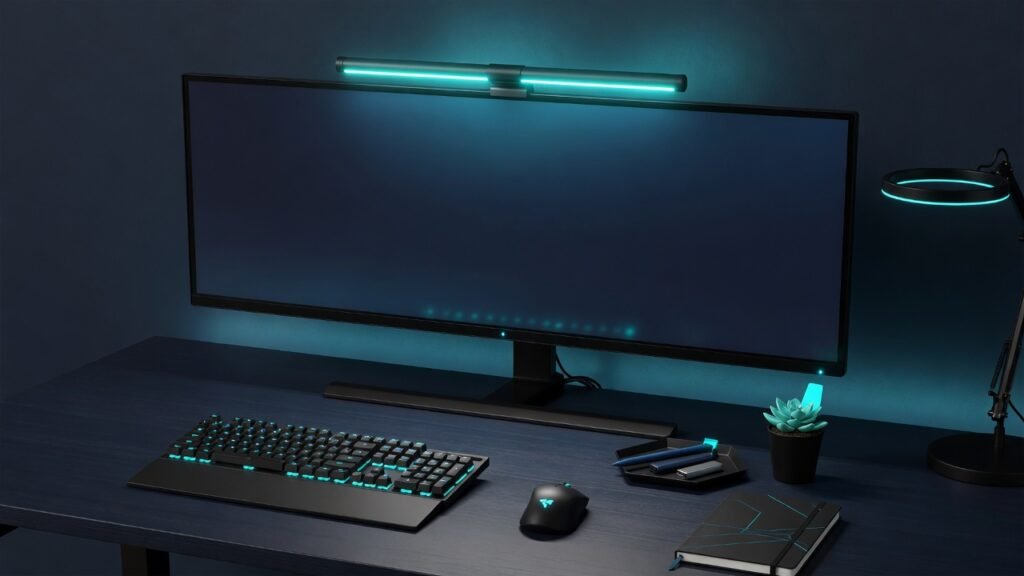
A monitor light bar sits on top of your screen and throws light down onto your desk — not at your screen, not in your eyes. It uses asymmetric optics to illuminate only the workspace in front of you, eliminating screen glare while reducing eye strain from working in dim rooms. The best monitor light bar 2026 options have matured significantly since the category emerged: wireless remotes, motion sensors that turn the light on when you sit down, and dual-sided lighting that also throws a bias light behind the monitor are now available even at mid-range prices. We tested 8 light bars from $35 to $160 to find the best monitor light bar 2026 for every budget. — not at your screen, not in your eyes. It uses asymmetric optics to illuminate only the workspace in front of you, eliminating screen glare while reducing eye strain from working in dim rooms. The best monitor light bar 2026 options have matured significantly: wireless remotes, motion sensors, and dual-sided lighting that also throws a bias light behind the monitor are now available even at mid-range prices. We tested 8 light bars from $35 to $160.
Table of Contents
Pair a light bar with our ergonomic home office guide — proper lighting reduces eye fatigue as much as proper posture reduces back pain. Also see our guide to fixing blurry monitor text if your screen is compounding the lighting problem.
| Model | Price | Backlight | Control | CCT Range | Curved OK |
|---|---|---|---|---|---|
| BenQ Halo 2 | $159 | Front+Rear | Wireless dial | 2700-6500K | Yes |
| BenQ Halo | $109 | Front+Rear | Wireless dial | 2700-6500K | Yes |
| Xiaomi Mi | $50 | Front only | Wireless puck | 2700-6500K | Thin only |
| Baseus | $35 | Front only | Touch bar | 3000-6500K | No |
What Is a Monitor Light Bar?
A monitor light bar is a narrow LED lamp that clips to the top of your computer monitor and shines light downward at an angle that hits your desk and keyboard while completely avoiding the screen. This is the key difference from a desk lamp, which reflects off the monitor and creates glare. A good light bar uses asymmetric optics — a lens design that shapes the light beam to illuminate a desk-width area without spilling onto the display. It frees up desk space that a traditional lamp would occupy and provides targeted task lighting that reduces eye strain during evening work sessions. Unlike a desk lamp that reflects off the monitor, the best monitor light bar 2026 designs keep light exactly where you need it — on your keyboard and documents — without creating screen glare. This targeted illumination is the defining characteristic of the best monitor light bar 2026 and the reason these devices have replaced desk lamps in so many home offices. — on your keyboard and documents — without creating screen glare. This is the key advantage that makes a monitor light bar worth the investment over a standard desk lamp for anyone who works in low-light conditions. that reduces eye strain during evening work sessions.
How We Tested the Best Monitor Light Bar 2026 Contenders
Each light bar was mounted on a 27-inch monitor and tested for screen reflection at maximum brightness, beam spread across a standard 48-inch desk, color rendering accuracy using a color checker card, and wireless remote responsiveness. A light bar must eliminate screen glare entirely — any light visible on the display is an instant disqualification. We also measured beam uniformity — whether the light is evenly distributed across the desk or creates a bright hotspot directly under the bar with dim edges.
See also: BTOD monitor light bar testing for independent glare measurements.
The Best Monitor Light Bar 2026: Our Tested Picks
1. BenQ ScreenBar Halo 2 — Best Premium
The Halo 2 is the best light bar at any price. It adds a motion sensor that turns the light on when you sit down and a redesigned wireless dial with haptic feedback. The dual-sided design throws light forward onto the desk AND backward behind the monitor as bias lighting — reducing the contrast between a bright screen and a dark wall, which is a major cause of eye fatigue. This dual-lighting approach is unique to BenQ and is the feature that justifies the premium over every other light bar on the market. The curved monitor adapter works with displays up to 1000R curvature. At $159 it is expensive, but no other light bar eliminates glare this completely while adding bias lighting. BenQ ScreenBar Halo 2 LED Monitor Light (US) / (UK)
2. BenQ ScreenBar Halo — Best Value Premium
The original Halo at $109 drops the motion sensor and haptic dial of the Halo 2 but keeps the dual-sided lighting, wireless controller, and curved monitor compatibility. For anyone who wants the bias-lighting experience without paying for the Halo 2 upgrades, this is the pick. BenQ ScreenBar Halo LED Monitor Light (US) / (UK)
Budget Picks Under $60
3. Xiaomi Mi Light Bar — Best Mid-Range
The Xiaomi Mi delivers BenQ-level color rendering (RA95 CRI) and a wireless puck remote for $50 — half the price of the BenQ Halo. It lacks the rear bias light and curved monitor support, but the front illumination is clean, the aluminum build feels premium, and the wireless remote is satisfyingly tactile. The pick for buyers who want 90% of the BenQ experience at one-third the price. Xiaomi Mi Computer Monitor Light Bar (US) / (UK)
4. Baseus Monitor Light Bar — Best Budget
At $35, the Baseus delivers asymmetric front lighting with three color modes and stepless dimming via a touch bar on the light itself — no remote. It does not match the BenQ or Xiaomi in glare control or build quality, and it cannot mount on curved monitors. But for someone testing whether a monitor light bar works for their setup before investing more, or for anyone on a strict budget, the Baseus is a legitimate best monitor light bar 2026 contender at its price point. For a flat monitor on a budget, it is a solid pick under $40 and a genuine best monitor light bar 2026 value option. and stepless dimming via a touch bar on the light itself — no remote. It does not match the BenQ or Xiaomi in glare control or build quality, and it cannot mount on curved monitors. But for a flat monitor on a budget, it is a solid pick under $40. Baseus Monitor Light Bar (US) / (UK)
What to Look for in the Best Monitor Light Bar 2026
Asymmetric Optics: The Only Feature That Matters
If a light bar spills light onto your screen, it is worse than no light bar at all — it adds glare you did not have before. A good light bar uses asymmetric optics to direct light exclusively downward. BenQ owns the patents on the best implementation, but Xiaomi and Baseus have developed competent alternatives at lower prices.
Bias Lighting: Worth the Premium
A rear-facing light that washes the wall behind your monitor with soft illumination reduces the contrast between a bright screen and a dark room — a proven method for reducing eye strain during long sessions. The BenQ Halo series is the only line with integrated bias lighting.
Curved Monitor Compatibility
Most light bars use a counterweight clamp that assumes a flat monitor back. Curved monitors require a wider clamp or an adapter. Check compatibility before buying — the Xiaomi and Baseus do not officially support curved displays. Even on flat monitors over 32 inches, the beam spread may not cover the full desk width — measure your monitor thickness and desk depth before ordering. For anyone searching for the best monitor light bar 2026, check your monitor or dock has an available USB port before ordering. Most light bars use a USB-A power connection, so check your monitor or dock has an available USB port — if not, you will need a USB wall adapter which i
s rarely included in the box.
The Verdict: Which Is the Best Monitor Light Bar 2026?
The BenQ ScreenBar Halo 2 ($159) is the best monitor light bar 2026 — motion sensor, wireless haptic dial, and dual-sided lighting with zero screen glare. The BenQ Halo ($109) drops the motion sensor but keeps the bias lighting that makes BenQ bars unique. For most people, the Xiaomi Mi ($50) delivers 90% of the experience at a third of the price — it is the smart buy in this category.
About the Author: Marcus Chen — Marcus Chen is a display technology specialist with 8 years of experience calibrating and reviewing monitors, panels, and visual hardware. His focus is honest, measurement-backed advice for home office and creative professionals. Learn more about our editorial standards.