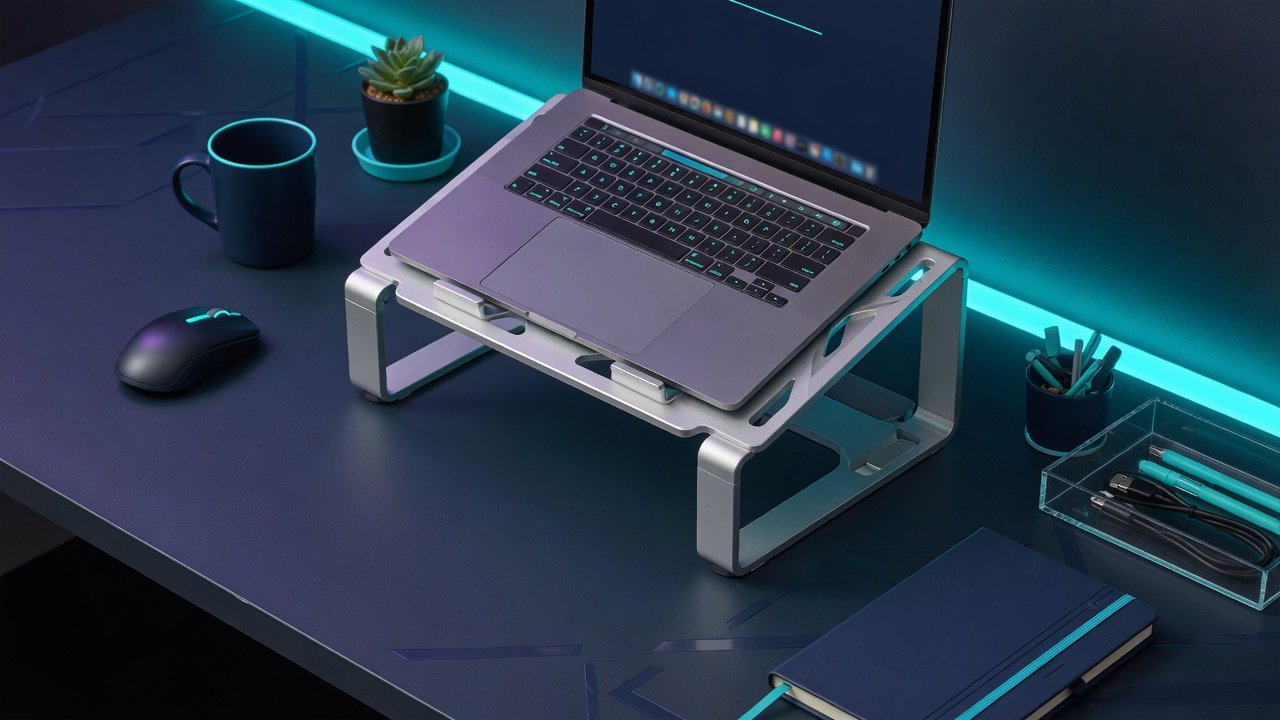
The best laptop stand 2026 is the one that puts your screen at eye level and then holds still while you type. I ranked five stands on the two things that decide whether you keep using one: how much the screen moves when you type, and whether the design lets your laptop breathe. Neither is measured to a standard in this category, so the guide rests on hands-on testing at Wirecutter and TechGearLab, manufacturer specifications, and thousands of owner reports across Amazon and Reddit.
In a Hurry? Start Here
TL;DR: The Rain Design iLevel 2 ($70–95 / ~£60–80) is the best laptop stand in 2026: its patented front-slider mechanism is the only design that adjusts height one-handed while the laptop stays in place, and Wirecutter has picked it as their top choice across multiple product generations. The Rain Design mStand ($45–65 / ~£35–50) is the most stable fixed stand here, a single forged slab with no joint or hinge to move, and carries 21,500+ Amazon ratings at 4.7 stars. Buy it once, never think about it again. The Nulaxy Pull-Out ($45–65 / ~£35–50) is the only stand here that handles both sitting and standing desk heights (1.2–21 inch range) and folds compactly, but wobbles noticeably above 12 inches. The Twelve South Curve ($65–90 / ~£50–70) is the lightest fixed stand here and leaves the most of the laptop's underside open to air, and carries the only published 2-year warranty in the category. The BOYATA ($30–45 / ~£25–35) gives you Z-type aluminum adjustability at the price of a fixed stand, backed by 8,400+ reviews, but the hinges are stiff by design and are the part that wears.
Table of Contents
- How We Researched Laptop Stands for 2026
- Rain Design iLevel 2: Best Premium Adjustable (9.0/10)
- Rain Design mStand: Best Fixed / Most Durable (8.5/10)
- Nulaxy Pull-Out Laptop Stand: Best Sit-Stand Adjustable (8.0/10)
- Twelve South Curve: Best Lightweight Fixed (7.5/10)
- BOYATA: Best Budget Adjustable (7.5/10)
- Comparison Table: All 5 Laptop Stands at a Glance
- What to Look For When Buying a Laptop Stand
- Sources
Disclosure: TechDeskZone is reader-supported. When you buy through links on our site, we may earn an affiliate commission at no additional cost to you. See our affiliate disclosure for details.
A laptop stand costs $30–95 / ~£25–80 depending on how much adjustment you want, and it fixes a biomechanical problem that a £1,200 chair can’t touch. When your laptop lies flat on a desk, the screen sits 8 to 12 inches below eye level, and your neck tilts 30 to 45 degrees forward to close the gap. Hansraj (2014, Surgical Technology International) modelled what that load does to the cervical spine: 15 degrees of forward head tilt puts roughly 27 lbs of force on it, 30 degrees pushes that to 40 lbs, and 45 degrees to 49 lbs. Eight hours a day, that amounts to your neck holding the equivalent of a carry-on suitcase with your chin.
How I Researched Laptop Stands for 2026
Start with what does not exist. There’s no RTINGS equivalent for laptop stands, and no outlet publishes instrumented stability data for them. Wirecutter’s team has tested laptop stands for years, which in practice meant typing at the same desk and watching for screen wobble. TechGearLab bought and tested 8 more and describe the same thing in words: “a tiny bit wobbly while typing,” “shaky if typing.” That’s the honest state of the art here, and it’s why this guide leans on structural facts you can check yourself: material, mass, base geometry, and how much of the laptop’s underside a stand leaves open.
For this guide, I cross-referenced every source I could find that did hands-on testing: Wirecutter, TechGearLab, The Gadgeteer, Pack Hacker, and more than a dozen individual product reviews. I mapped Amazon review patterns across seven laptop stand brands, pulling complaint clusters and durability patterns. I analysed Reddit consensus threads in r/macsetups, r/Workspaces, and r/digitalnomad: the places where owners report what happens after 12 months of daily use, which is fundamentally different from what a reviewer sees in a week. And I read the ergonomic research myself: Hansraj (2014) for cervical load modelling, PMC6181668 for the posture measurement data, and the universal ergonomic guideline consensus from OSHA, HSE, CCOHS, and Cornell University.
One thing I won’t do: cite phantom studies. Two statistics get repeated across laptop stand coverage without a verifiable original, and the section at the end of this guide takes both of them apart. The evidence chain I’m confident in: the Hansraj biomechanics, the PMC6181668 posture data, the Cornell and OSHA guidelines, and the owner feedback from thousands of people who bought these stands and reported back.
No brand paid for placement. No brand saw this article before publication. Every score reflects my analysis of the available data. The dimension breakdown under each stand rates it out of 10 on five dimensions; the overall score is a weighted judgment across those dimensions rather than an average, because stability and build quality matter more in this category than portability does.
Rain Design iLevel 2: Best Premium Adjustable (Score: 9.0/10)
Price: $70–95 / ~£60–80 | Type: Adjustable (front-slider) | Height: 5.4–7.9 inches | Weight: 1.6 kg (3.5 lb) | Material: Anodized aluminum | Laptop size: Fits most 11–16 inch laptops
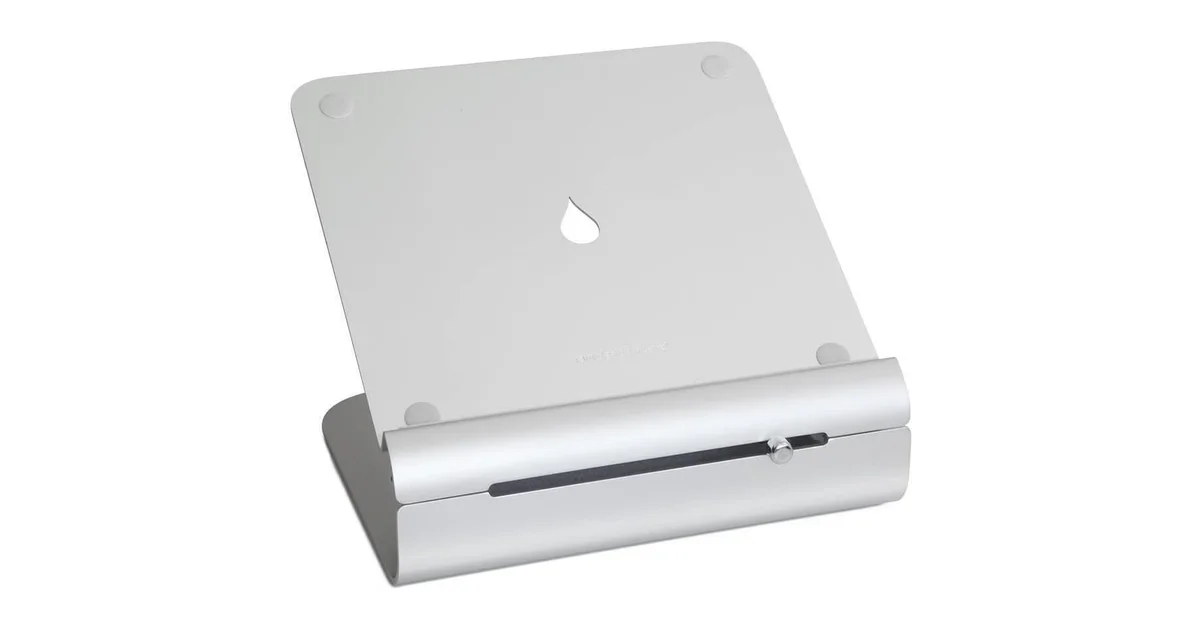
The iLevel 2 has one feature no other laptop stand offers: a front-slider height adjustment that lets you change the stand’s height while the laptop stays in place. No lifting the computer. No setting it down, adjusting a joint, picking it back up. You move a knob on the front panel and the stand rises or lowers smoothly. Wirecutter named the iLevel 2 its top pick for 2026, a position it has held across multiple product generations,
The slider solves a real ergonomic problem. If your stand is a fixed height, you set it once and hope your chair height, desk height, and posture stay consistent. They don’t. You slouch. You adjust your chair. You lean in. A fixed stand locks you into one position. The iLevel 2’s 5.4 to 7.9 inch range isn’t dramatic (the Nulaxy Pull-Out below spans 1.2 to 21 inches), but the front-slider mechanism means you actually use the adjustability. The iLevel 2 changes height with the laptop still in place, one hand on the front knob, in about two seconds. That’s the difference between occasional adjustment and constant fine-tuning throughout the day.
Build quality is exceptional. Rain Design’s own wording is that the anodized aluminum “matches MacBooks,” and it comes in Silver, Gold, Space Gray, Black, Midnight, and Starlight. The 1.6 kg weight and wide base make it the most stable stand in any reasonable height range, and there are no plastic components anywhere. The design has been on the market essentially unchanged for years because the core mechanism, solid aluminum with a precision sliding joint, has nothing in it that degrades. How-To Geek named it “Best Overall” in their laptop stand roundup, praising the “industrial-grade build.”
What’s missing. There is no published weight capacity from Rain Design, a strange omission for a premium product. The height range tops out at 7.9 inches, which is fine for sitting but inadequate for standing desk use. Most people need at least 12 inches of lift at standing height. At 1.6 kg, this is a desk-permanent product. It doesn’t fold. It doesn’t travel. Wirecutter notes that typing directly on a laptop at stand height causes screen bounce regardless of the stand. This is true of every stand in the category, but worth stating explicitly: you need an external keyboard and mouse for any ergonomic benefit. Rain Design doesn’t publish warranty terms on their website, which is disappointing for a product at this price point.
Pros:
- Patented front-slider mechanism: adjust height one-handed without lifting the laptop
- Wirecutter top pick for 2026, a position it has held across multiple generations
- Anodized aluminum: matches MacBook finishes, zero plastic components
- Excellent stability: wide base and 1.6 kg weight eliminate wobble
- Cable management hole in rear spine
Cons:
- Rain Design does not publish a maximum weight capacity on their spec sheet
- Warranty terms not publicly documented: no warranty page on raindesigninc.com
- Height range limited to 5.4–7.9 inches: inadequate for standing desk use
- 1.6 kg: not portable; this is a permanent-desk product
- $70–95 / ~£60–80: the most expensive stand in this guide, and the price gap over the mStand buys the slider, not better build
Best for: Anyone with a permanent desk setup who wants the most precise, effortless height adjustment available. The front-slider mechanism is the differentiator. If you adjust your screen height more than once a day, this feature alone justifies the premium over the mStand. Avoid if: you use a standing desk, need portability, or want a published warranty. The Nulaxy Pull-Out below handles sit-stand for less money, and the mStand gives you the same Rain Design build quality without the slider.
Score breakdown: Stability 9 | Build 10 | Adjustability 8 | Portability 3 | Value 7. Overall 9.0/10
Rain Design mStand: Best Fixed / Most Durable (Score: 8.5/10)
Price: $45–65 / ~£35–50 | Type: Fixed | Height: 5.9 inches | Weight: 1.46 kg (3.0 lb) | Material: Single-piece forged 2.5mm anodized aluminum | Laptop size: 16-inch MacBook Pro confirmed to fit; 7.5 in deep platform
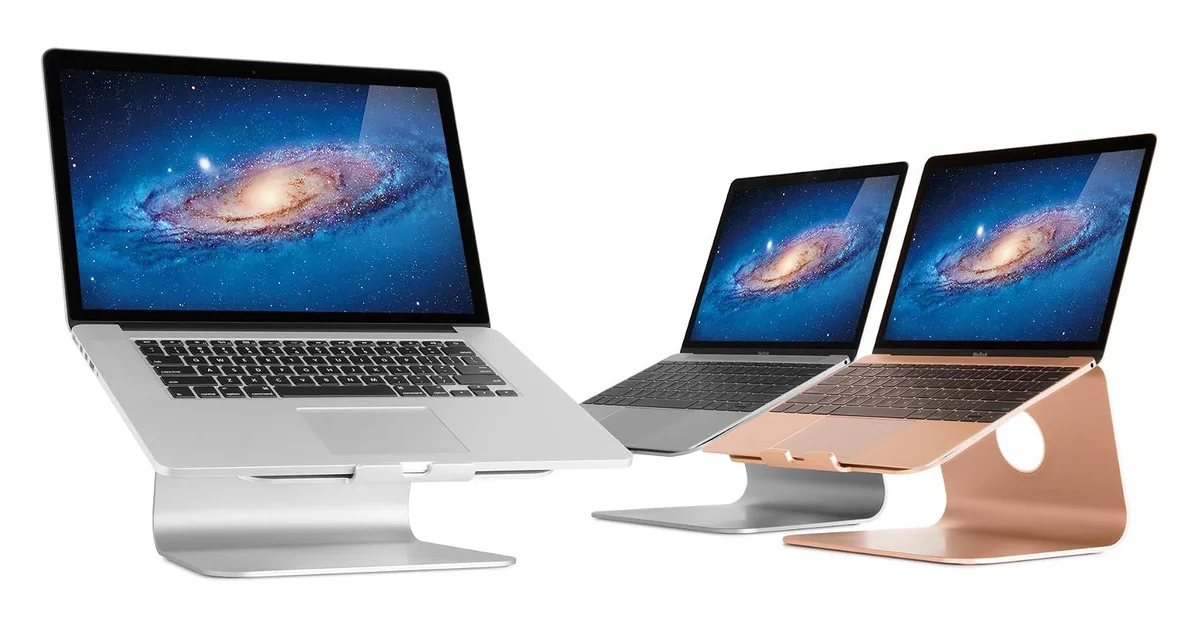
The mStand is the fixed stand you buy once. Rain Design makes it from a single solid plate of 2.5mm anodized aluminum: no moving parts, no hinges, no screws, no joints, no mechanisms, so there is nothing to wear out, and the design has barely changed since 2008. TechGearLab, which bought and tested eight stands, named it their best overall pick. A WIRED editor described it as the stand that “runs my household” in a personal endorsement piece. MacRumors forum users report units still going strong after 3–4 years and multiple laptop upgrades: “a few MacBooks later it still does its job.”
The numbers tell the story. At least 21,500 Amazon ratings at 4.7 stars: the highest rating count of any stand in this guide. iMore called it “an excellent companion to any MacBook.” The 5.9-inch fixed height raises a laptop screen to roughly eye level on a 29-inch desk for people between roughly 5-foot-6 and 6-foot-1. The 2-inch cable routing hole in the rear spine is a small touch that matters: it keeps charging and data cables organised behind the stand instead of snaking across the desk.
The trade-offs are permanent. No height adjustment. No tilt adjustment. The stand is 5.9 inches tall and that’s it. If you change chairs, switch to a standing desk, or share the workspace with someone of a different height, the mStand cannot adapt. The 5.9-inch lift suits most people between roughly 5-foot-6 and 6-foot-1 at a standard desk, and outside roughly 5-foot-4 to 6-foot-2 it stops working. These are approximate ranges because exact eye-level height depends on torso length, chair height, and desk height. Rain Design gives the platform as 10 inches wide by 7.5 inches deep and confirms a 16-inch MacBook Pro sits securely on it; 17-inch machines are not listed as supported. The rear lip physically limits what fits. Rubber pad adhesive can soften from sustained laptop heat, though replacement pads are cheap.
Thermal performance: not the best. The solid aluminum slab is the trade-off. It lifts the machine off the desk, which helps on its own, but it covers most of the underside, so it moves less air than an open frame. Geometry matters as much as elevation here, and the mStand is not the stand to choose if cooling is your priority. For anyone running sustained CPU-heavy workloads on a fanless laptop (MacBook Air, Surface Pro), the Twelve South Curve below leaves far more of the case exposed.
Pros:
- Single-piece forged 2.5mm aluminum: zero moving parts, nothing to wear out
- Single-piece construction: the steadiest stand here, with no joint or hinge to move
- 21,500+ Amazon ratings at 4.7 stars: the highest rating count in this guide
- Proven design: same core product since 2008
- Matches MacBook finishes: Silver, Space Gray, Gold, Midnight, Starlight
- Rear cable routing hole keeps desk tidy
Cons:
- Fixed 5.9 inch height: no adjustability whatsoever; useless for standing desks
- Solid slab covers most of the laptop’s underside: less airflow than an open-arch design
- 17-inch laptops are not listed as supported
- Warranty terms not publicly documented by Rain Design
- Rubber pads sit on adhesive that can soften from sustained laptop heat; replacements are cheap
Best for: Anyone with a permanent single-height desk who wants the most stable, most durable laptop stand available and never needs to adjust screen height. If your workspace doesn’t change, same desk, same chair, same position, this is all the stand you need, and it will outlast every laptop you put on it. Avoid if: you need any adjustability at all, use a standing desk, are significantly outside the 5-foot-4 to 6-foot-2 height range for this fixed position, or run sustained heavy workloads on a fanless laptop. The Twelve South Curve below runs cooler; the iLevel 2 above solves the adjustability problem.
Score breakdown: Stability 10 | Build 10 | Adjustability 2 | Portability 3 | Value 9. Overall 8.5/10
Nulaxy Pull-Out Laptop Stand: Best Sit-Stand Adjustable (Score: 8.0/10)
Price: $45–65 / ~£35–50 | Type: Adjustable (pull-out, articulated, foldable) | Height: 1.2–21 inches | Weight: 1.25 kg (2.76 lb) | Material: Full aluminum, vented panel | Laptop size: 10–17 inch
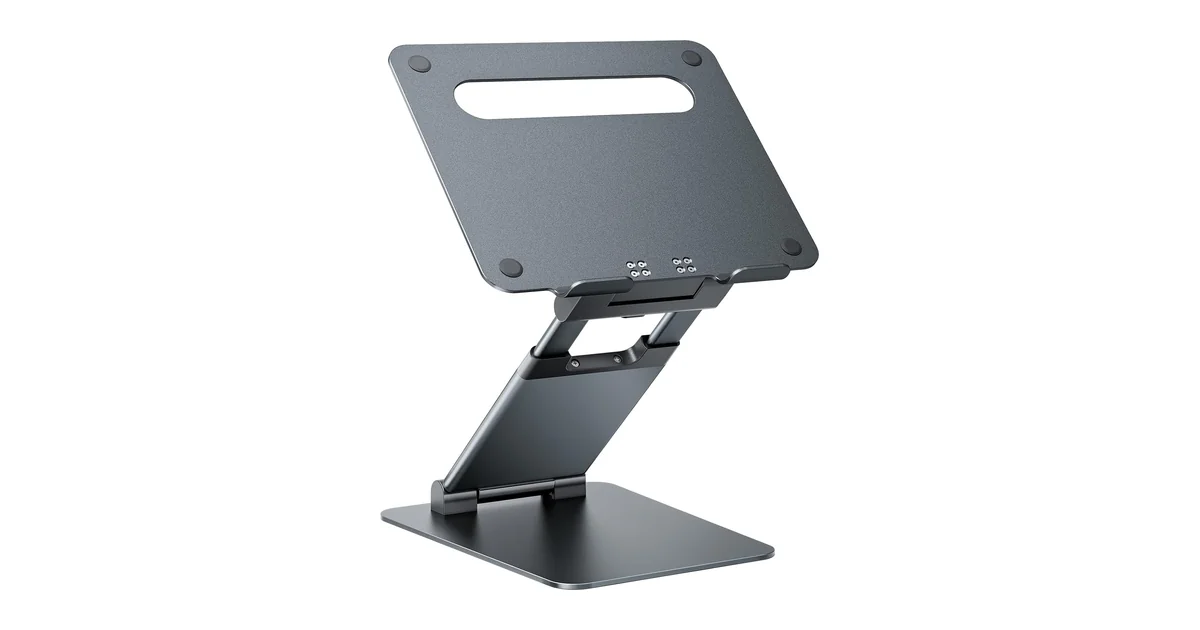
The Nulaxy Pull-Out Height Adjustable Laptop Stand solves a problem the iLevel 2 ignores: standing desk compatibility. At its 1.2-inch minimum it sits nearly flat under a laptop. At 21 inches it raises a screen to eye level for someone six feet tall at a standing desk, and TechGearLab notes that at full extension it “essentially doubles as a standing desk.” That range is what earned it their award for the best laptop stand for height adjustment. It’s not, however, a travel stand: it folds to roughly 10.9 × 10.5 × 2.3 inches, which TechGearLab judged “not quite small enough to slide into a laptop bag.” Portable between rooms and desks, yes. Portable in a carry-on, no.
Stability depends on height. TechGearLab tested this stand and found it “does okay when the stand is adjusted to a low height,” but that “the higher you have the stand extended, the more it shakes,” listing “shaky if typing” among its drawbacks. That’s the physics of the design: the arm extends 14 inches and articulates, so every extra inch is more leverage on the joints holding the platform. At standing height the shake is noticeable. At sitting height it’s comparable to a budget fixed stand. Nulaxy rates capacity at 22 lbs (10 kg), which covers heavy 17-inch gaming laptops, though wobble at full extension with a laptop that heavy would be worse still.
Build quality is better than the price suggests. Nulaxy describes the structure as full aluminum, with a vented panel under the laptop and rubber pads at the contact points, so there’s no plastic base to flex under load. At 1.25 kg (2.76 lb) it’s light enough to move around a room and heavy enough to sit still at desk height. Height is set with a retractable pull handle, and the platform tilts toward you as well as rising. What it does not have is cable management: TechGearLab notes “the C5 does not feature cable management devices or slots,” so plan to route your charging cable around it. Nulaxy doesn’t publish a warranty duration, so treat any coverage claim as unverified.
The long-term concern: joint play. Articulated joints are the wear point on any adjustable stand, and no one has published long-term durability testing for this model. For a stand used at a single height at a permanent desk, this isn’t a concern. Set it and leave it. For a stand that gets folded, transported, and readjusted daily, expect the joints to loosen gradually and require periodic retightening.
Pros:
- 1.2 to 21 inch range: covers flat-desk, sitting, and standing in one product
- Folds to roughly 10.9 × 10.5 × 2.3 inches: compact for storage and for moving between desks
- 22 lb weight capacity: handles even 17-inch gaming laptops
- Full aluminum with a vented panel: no plastic base to flex under load
- Roughly $45–65 / ~£35–50: sit-stand range for about half the iLevel 2’s price
Cons:
- Noticeable wobble at heights above 12 inches: confirmed by TechGearLab testing
- Not small enough for a laptop bag: TechGearLab’s own assessment of the folded frame
- No cable management: no routing slots in the platform or arm
- Articulated joints are the wear point: expect gradual play if you fold and readjust daily
- Warranty duration not publicly stated
Best for: Anyone who splits their work between sitting and standing, works from multiple locations, or wants one stand that handles every possible desk scenario without buying separate fixed and adjustable units. Avoid if: typing stability at maximum height is critical. The Nulaxy wobbles at full extension, and that’s a physics limitation, not a defect. For a permanent single-height desk, the mStand is more stable.
Score breakdown: Stability 6 | Build 9 | Adjustability 10 | Portability 7 | Value 7. Overall 8.0/10
Twelve South Curve: Best Lightweight Fixed (Score: 7.5/10)
Price: $65–90 / ~£50–70 | Type: Fixed (bent aluminum tube) | Height: 6.5 inches | Weight: 0.65 kg (1.43 lb) | Material: Bent aluminum tube, rubberized silicone contact points | Max weight: 7 lb (3.2 kg)
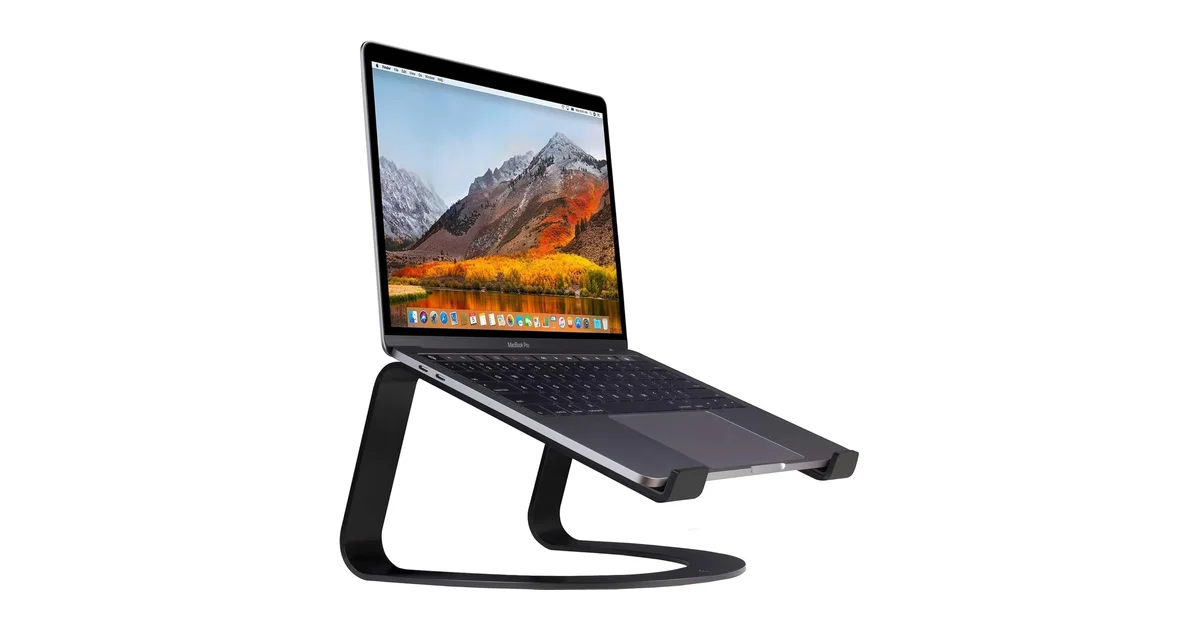
The Curve’s advantage is architectural. It’s a single bent aluminum tube in an open arch that leaves most of the laptop’s underside in open air, where the mStand’s solid slab covers much of it. More exposed surface means more heat leaving the case, and for a fanless laptop like the MacBook Air that difference decides how long it can hold a sustained load before it throttles.
Airflow versus steadiness: pick one. The trade-off for that open arch is movement. A tube bent into a cantilever has less bracing than a forged slab, and a 0.65 kg stand has less mass to absorb a keystroke, so the screen visibly micro-bounces if you type on the laptop keyboard while it sits on the stand. This isn’t a defect, it’s the structural cost of the open design. Type on an external keyboard, which you should do with any laptop stand anyway, and the movement stops mattering.
Portability with limits. At 0.65 kg (1.43 lb), the Curve is less than half the weight of the mStand (1.46 kg) and the iLevel 2 (1.6 kg). It doesn’t fold, but the open tubular design is easier to pack than a solid aluminum slab. The 7 lb weight capacity is the lowest in this guide: fine for any MacBook (the 16-inch MacBook Pro weighs 4.7 lb) but explicitly excludes heavy gaming laptops like the Razer Blade 18 or Alienware m18. Twelve South also makes the Curve Flex, an adjustable folding version, but multiple MacRumors forum users report the Flex model “keeps lowering on its own unless I tighten the screws,” a complaint specific to the adjustable model, not the fixed Curve. The fixed Curve has no mechanism to fail. The manufacturer offers a 2-year warranty, the only stand in this guide with clearly published warranty terms on the manufacturer’s own site.
Pros:
- Open-arch design leaves most of the laptop’s underside exposed to open air
- Best airflow of the fixed stands here: a sensible pick for a fanless MacBook Air
- 0.65 kg: lightest desk-permanent stand in this guide
- 2-year manufacturer warranty: the only stand here with clearly published terms
- 1,840+ Amazon ratings at 4.7 stars: strong owner satisfaction
Cons:
- Screen micro-bounces if you type directly on the laptop: less bracing than a forged slab
- 7 lb weight limit: excludes heavy gaming laptops (Razer Blade 18, Alienware m18)
- Fixed 6.5 inch height: no adjustability; may be too tall for users under ~5’6″
- No cable management: no routing hole or channel
- Does not fold: the Curve Flex exists but has its own reliability issues
Best for: MacBook Air owners, anyone with a fanless laptop, or anyone who wants the lightest fixed stand here with the most open underside and warranty terms actually published. Avoid if: typing stability is your priority, or your laptop weighs more than 7 lb. The mStand above is the steadier stand; the Nulaxy Pull-Out handles heavy laptops with its 22 lb capacity.
Score breakdown: Stability 6 | Build 8 | Adjustability 2 | Portability 6 | Value 6. Overall 7.5/10
BOYATA: Best Budget Adjustable (Score: 7.5/10)
Price: $30–45 / ~£25–35 | Type: Adjustable (dual hinge) | Height: 3.9–7.4 inches | Weight: ~1.2 kg (2.65 lb) | Material: Metal frame, 3mm base plates (aluminum on the UK listing, alloy steel on the US) | Laptop size: 11–17.3 inch
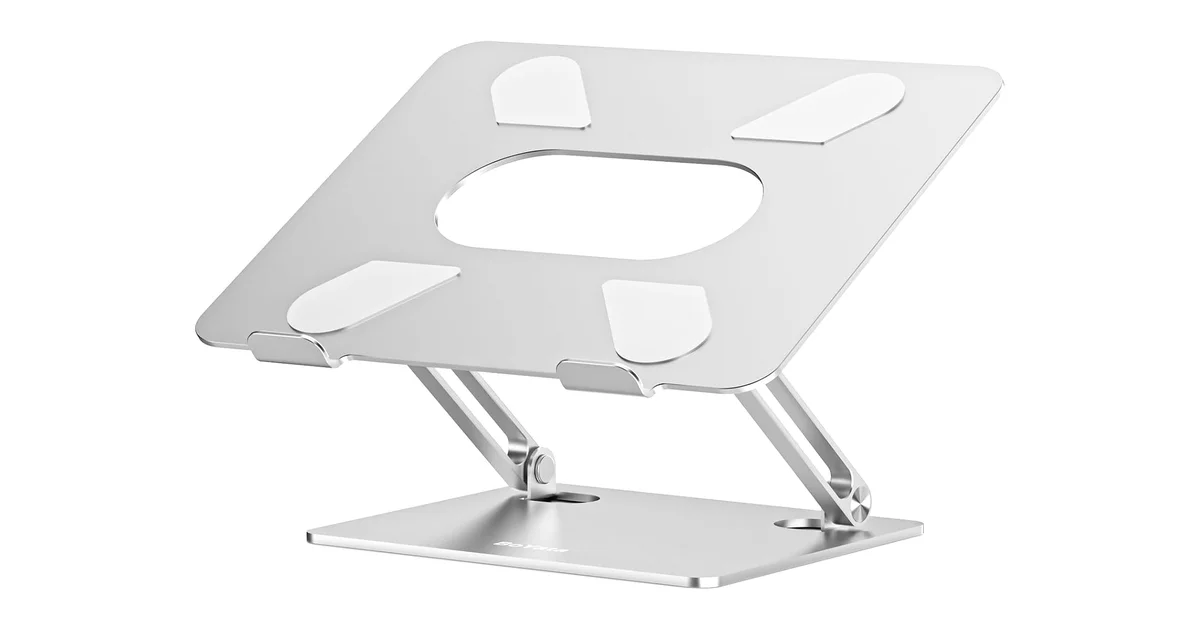
The BOYATA Z-type adjustable stand proves that all-metal adjustable construction doesn’t have to cost premium money. At roughly $30–45 / ~£25–35, you get a dual-hinge Z-frame with 3mm metal base plates, a 3.9 to 7.4 inch height range, and compatibility with laptops from 11 to 17.3 inches. With 8,400+ Amazon reviews, more than four times the Twelve South Curve’s review count, this is the stand that actual buyers are purchasing at scale, even if the major outlets largely ignore the brand.
Material depends on which storefront you buy from. BoYata sells this stand in more than one material, and the listing you land on decides which one you get. At the time of writing, the US listing describes the frame as alloy steel while the UK listing describes it as aluminum. Both are metal, both are silver, and the multi-angle riser design is the same product line. If the specific alloy matters to you, read the material line on the listing you are actually buying from, because the two marketplaces don’t currently agree.
Build and stability at the price. The metal construction is solid at this price point, but the hinge mechanism comes with trade-offs. Z-type hinges have to hold a set angle against the weight of a laptop, so they’re stiff by design, and stiff hinges are also the part that wears. The 12.5 × 10 × 2.4 inch footprint is bulkier than the fixed aluminum stands in this guide, using more desk real estate in exchange for the Z-type adjustability. At ~1.2 kg, it’s not designed for travel. The Nulaxy Pull-Out above is more portable, because it actually folds.
Weight capacity confusion. This is worth flagging because it affects buying decisions. BOYATA’s weight capacity appears as 22 lb in some sources, 25 lb in others, and 44 lb (20 kg) in one outlier review. The 44 lb figure is almost certainly an error. It’s inconsistent with the stand’s metal Z-type construction and appears in no other source. I cite 22 lb as the most commonly cross-referenced figure, but the manufacturer’s own Amazon product page should be checked for the authoritative number. For context, even a fully-loaded 17-inch gaming laptop rarely exceeds 8 lb, so any published figure above 15 lb covers all realistic use cases.
Pros:
- 8,400+ Amazon reviews: more owner feedback than most premium competitors combined
- 3.9–7.4 inch Z-type adjustability: find your exact ergonomic height
- 3mm metal construction: all-metal where many budget stands use plastic
- 11–17.3 inch compatibility: rare full-size laptop support at this price
- Roughly $30–45 / ~£25–35: Z-type adjustability for the price of a fixed stand
Cons:
- Hinges are stiff by design: they hold a set angle, but they are the part that wears
- Adjusting is a two-handed job, and frequent adjustment is what wears the hinges
- Weight capacity unclear: conflicting figures across sources (22/25/44 lb)
- Bulky footprint (12.5 × 10 × 2.4 inches): uses more desk space than fixed stands
- Does not fold: not a travel stand despite adjustable design
- Industrial aesthetic: functional metal look may not suit all desk setups
Best for: Buyers who want Z-type aluminum adjustability but can’t justify $70–95 / ~£60–80 for the iLevel 2. At roughly half the price, the BOYATA provides height adjustment with solid aluminum construction and enormous verified-owner review volume. Avoid if: you adjust your stand height daily. The stiff hinges will frustrate you, and the reported loosening over time is a concern with frequent adjustment. For daily height changes, the iLevel 2’s front slider is worth the premium. For occasional adjustment at a permanent desk, the BOYATA is the best value in the adjustable category.
Score breakdown: Stability 7 | Build 7 | Adjustability 7 | Portability 3 | Value 9. Overall 7.5/10
Comparison Table: All 5 Laptop Stands at a Glance
| Product | Price (USD) | Price (GBP) | Type | Height | Weight | Max Laptop | Material | Foldable | Warranty | Score |
|---|---|---|---|---|---|---|---|---|---|---|
| iLevel 2 | $70–95 | ~£60–80 | Adjustable (slider) | 5.4–7.9 in | 1.6 kg | Not published | Anodized aluminum | No | Not published | 9.0 |
| mStand | $45–65 | ~£35–50 | Fixed | 5.9 in (fixed) | 1.46 kg | Not published | Forged 2.5mm aluminum | No | Not published | 8.5 |
| Nulaxy Pull-Out | $45–65 | ~£35–50 | Adjustable (pull-out) | 1.2–21 in | 1.25 kg | 22 lb | Full aluminum | Folds, bulky | Not published | 8.0 |
| Twelve South Curve | $65–90 | ~£50–70 | Fixed (open arch) | 6.5 in (fixed) | 0.65 kg | 7 lb | Bent aluminum tube | No | 2 years | 7.5 |
| BOYATA | $30–45 | ~£25–35 | Adjustable (dual hinge) | 3.9–7.4 in | ~1.2 kg | ~22 lb (disputed) | Aluminum / alloy steel | No | Not published | 7.5 |
All prices approximate; Amazon pricing fluctuates daily. Rating counts are as displayed on the Amazon listings and change constantly. Specifications from manufacturer product pages. No outlet publishes instrumented stability measurements for this category, so none are quoted here.
What to Look For When Buying a Laptop Stand
The One Non-Negotiable: External Keyboard + Mouse
Every stand in this guide raises a laptop screen to eye level. That fixes your neck angle. It also makes the built-in keyboard unreachable without creating a new ergonomic problem: extended wrist flexion that can cause its own repetitive strain issues within weeks. The universal guideline from OSHA, HSE, CCOHS, and Cornell University’s ergonomics department is consistent: your wrists should be straight and parallel to the floor while typing. A laptop keyboard at stand height makes that impossible. Budget $30–45 / ~£25–35 for a basic external keyboard and mouse, roughly the cost of the cheapest stand in this guide. Without them, the stand is not doing its job.
Fixed vs Adjustable: Think About How Often Your Setup Changes
Fixed stands are simpler, more stable, more durable, and cheaper. They sit at one height and stay there forever. The mStand’s single forged slab is the steadiest design in this guide. But if your chair height changes, your desk height is non-standard, or you’re still experimenting with your ergonomic setup, a fixed stand locks you into a position that may be wrong. Adjustable stands let you find your exact height, and change it when circumstances change. The iLevel 2’s front slider makes daily micro-adjustments effortless. The Nulaxy Pull-Out’s 1.2–21 inch range handles sitting, standing, and everything in between. The BOYATA’s stiff Z-type hinges are fine for set-and-forget. The key variable is not “which is better” but “how often do you actually change your desk configuration?”
Stability: What You Can Judge Before You Buy
Nobody publishes millimetre deflection figures for laptop stands, so judge the geometry instead. A single piece of forged aluminum cannot move at the joints, because it has none. An adjustable stand has hinges or shafts by definition, and every one of those is a place where force from your hands can travel. Mass helps too: a heavier stand resists a keystroke better than a light one, and a wide base beats a narrow one. That gives a simple ordering. Fixed forged aluminum is steadiest, a fixed tube arch is next, and multi-joint adjustable stands come last, with wobble getting worse the higher you extend them. TechGearLab’s hands-on testing lands in the same place, describing the fixed stands as stable for typing and the tall adjustable ones as shaky.
Thermals: What Elevation Actually Does
Elevating a laptop helps, and the effect is measurable. Notebookcheck played The Witcher 3 on a 15.6-inch MSI gaming laptop for over an hour as a control, then repeated the run with a powered cooling pad underneath: average CPU temperature fell from 92°C to 80°C, and the surface hotspot from 44°C to 40°C. A passive stand will not match that, because the pad has fans, but the mechanism is the same one a stand relies on. Air moving under the case carries heat away faster than a desk surface does. The limit is your laptop’s own vents. If they draw from the bottom, elevation and an open frame both help. If your intake vents are on the sides or rear, a stand mostly just changes the angle and will not cool the machine. Check where your laptop breathes before buying a stand for thermal reasons.
Warranty Transparency: A Genuine Red Flag in This Category
Of the five stands in this guide, only one (the Twelve South Curve) has clearly published warranty terms on the manufacturer’s own website (2 years against manufacturing defects). Rain Design, the manufacturer of my top two picks (iLevel 2 and mStand), has no warranty page on raindesigninc.com. Nulaxy has a warranty registration page that requires enrolment within 30 days of purchase but does not state coverage duration anywhere. BOYATA has a “Warranty” link on their product page that leads to no information. This is not an indictment of the products (the mStand and iLevel 2 have outstanding build quality and near-zero failure reports), but it’s a transparency gap worth noting. When a company won’t publish how long they stand behind their product, you’re buying on reputation and Amazon reviews rather than a contractual commitment.
Why You Should Ignore the “14-Degree Neck Angle Reduction” Statistic
You’ll see this claim repeated across laptop stand buying guides: “raising your laptop screen reduces neck flexion by 14 degrees.” It’s typically attributed to Applied Ergonomics or a generic “study.” No such paper exists in PubMed. There is no DOI, no author list, no publication volume or issue number. The same applies to the “30% reduction in C5-C6 disc pressure” attributed to the journal Work. Both are phantom citations: plausible-sounding statistics that have been copied from one commercial blog to another without anyone checking the original source. The real evidence for laptop stand ergonomics comes from a chain of established research: Hansraj’s cervical load modelling (2014), PMC6181668’s posture measurement data (2018), the universal ergonomic guideline consensus, and extrapolation from the much larger body of research on monitor height and neck posture. That evidence supports laptop stand use. It’s just not as tidy as “14 degrees.”
Once your screen is at eye level, the rest of the workspace follows the same principle. See our complete best home office setup guide for the chair, keyboard and monitor arrangement that locks in the posture.
Sources
Every claim in this guide traces back to one of these sources, named here so you can check the underlying data yourself.
- Rain Design: iLevel 2 Official Specifications
- Rain Design: mStand Official Specifications
- Twelve South: Curve Official Product Page
- BOYATA: Adjustable Laptop Stand Official Product Page
- Wirecutter (NYT): The Best Laptop Stands 2026
- Notebookcheck: How well does a laptop cooling pad work? (instrumented temperature test, 2020)
- TechGearLab: Best Laptop Stand 2026 (tested, 8 models)
- The Gadgeteer: Best Laptop Stand 2026 (May 2026)
- Pack Hacker: Roost V3 Laptop Stand Review (8.9/10)
- iMore: Rain Design mStand Review
- How-To Geek: Best Laptop Stands 2026
- PMC6181668: Posture and Muscle Activity During Laptop Use (2018, peer-reviewed)
- Hansraj KK (2014): Assessment of Stresses in the Cervical Spine (Surgical Technology International)
The Verdict
Winner: Rain Design iLevel 2: At $70–95 / ~£60–80, the iLevel 2 has a patented front-slider height mechanism that no competitor offers. It adjusts screen height one-handed while the laptop stays in place. Every other adjustable stand requires two hands and lifting the laptop. Wirecutter picked this stand as their top choice, a position it has held across multiple product generations. Rain Design says the anodized aluminum matches MacBooks, and the wide base at 1.6 kg (3.5 lb) eliminates wobble at sitting height. The height range tops out at 7.9 inches: adequate for sitting, not for standing desks. The company does not publish a warranty page, which is a genuine transparency gap at this price. Buy this if you work at a permanent sitting desk and want the easiest, most precise height adjustment available.
Best Fixed / Most Durable: Rain Design mStand: At $45–65 / ~£35–50, the mStand is a single solid plate of 2.5mm anodized aluminum with no moving parts. TechGearLab named it their best overall pick after buying and testing eight stands. 21,500+ Amazon ratings at 4.7 stars is the highest rating count in this guide. Fixed 5.9-inch height with no adjustment. Its solid slab covers most of the laptop's underside, so it moves less air than the open-arch Curve. If your desk setup never changes, this is the stand that will outlast every laptop you put on it.
Best Sit-Stand: Nulaxy Pull-Out: At $45–65 / ~£35–50, the Nulaxy Pull-Out spans 1.2 to 21 inches: the only stand in this guide that handles flat-desk use, sitting, and standing. It folds to roughly 10.9 × 10.5 × 2.3 inches, compact enough to store between uses but, on TechGearLab's assessment, not small enough for a laptop bag. TechGearLab confirms it wobbles at heights above 12 inches, a physics limitation of the articulated extending arm, not a defect. At standard sitting heights stability is adequate. The 22 lb weight capacity handles 17-inch gaming laptops, and the frame is full aluminum with a vented panel. The ideal pick for anyone who splits time between sitting and standing but can't budget for two separate stands.
Best Lightweight Fixed: Twelve South Curve: At $65–90 / ~£50–70, the Curve's open-arch bent-aluminum-tube design leaves most of the laptop's underside in open air, where the mStand's slab covers much of it. The trade-off is movement: a bent tube has less bracing and less mass than a forged slab, so the screen micro-bounces if you type on the laptop keyboard. The 7 lb weight limit excludes heavy gaming laptops. The only stand in this guide with a clearly published 2-year manufacturer warranty. Best for MacBook Air owners and anyone with a fanless laptop running sustained workloads.
Best Budget Adjustable: BOYATA: At $30–45 / ~£25–35, the BOYATA gives you Z-type aluminum adjustability (3.9–7.4 inches) at the price of a fixed stand. 8,400+ Amazon reviews confirm strong owner satisfaction at scale. The 3mm aluminum plates are solid; the hinges are the weak point: adjusting is a two-handed job, and that repeated adjustment is what wears them. For a permanent-desk setup where you adjust the height once and leave it, this is the best value in the adjustable category.
← Back to Best Picks Hub